
ROS2-Z02-ROS2 Tools: Coordinate Transforms (EXEC2) — Hands-on: the Turtle Escort Case
Introduction
This chapter is about implementing the “turtle escort” case. Most of the code follows the relevant code from the previous chapter, ROS2-Z01-ROS2 Tools: Coordinate Transforms (EXEC1) — Hands-on: the Turtle Following Case. So it's best to get the previous chapter's result working first before doing the hands-on work here.
Case requirements & analysis
Requirement: build on what the previous chapter asked you to write. Taking the native turtle (turtle1) of the turtlesim_node node as the geometric centre, spawn several new turtles (three, for example, i.e. turtle2, turtle3, turtle4). Whether turtle1 sits still or is driven around with the keyboard, turtle2 must target turtle1's geometric centre and escort it in some formation.
Analysis: in the previous chapter, the core of the “turtle following” case was working out the position of turtle1 relative to turtle2. Once you have that position you can use it as the target point and drive turtle2 towards it. In this chapter, the core becomes working out the positions of the various points laid out around the native turtle turtle1 relative to the other turtles. Those relative positions can likewise be found with coordinate transforms, where:
- Each escort position is fixed relative to the native turtle
turtle1's frame, so you can broadcast the position of those static coordinate points relative to the native turtle with static broadcasting. - As for the turtles, you first broadcast each turtle's frame relationship relative to
worldseparately, then listen to those frame relationships to get the frame relationship of the static coordinate points relative to eachturtle.
Once the coordinate relationships are worked out, you can compute and publish the corresponding velocity commands to drive the escort of several turtles.
Flow overview
The case already has the “spawn a new turtle” and “broadcast and listen to turtle frame transforms” parts done, so all that's left here is to write a launch file that organises the nodes. The main steps are:
- Write a
launchfile that integrates the nodes; - Build;
- Run.
We'll implement the case in C++ and in Python as before, and both follow the steps above.
Preparation
See the previous chapter, ROS2-Z01-ROS2 Tools: Coordinate Transforms (EXEC1) — Hands-on: the Turtle Following Case. It's strongly recommended that you get that hands-on case working first.
Case implementation
1. Writing a launch file that integrates the nodes
We can start with the escort for one turtle, requiring it to end up at a particular spot near the native turtle:
In the launch directory of the cpp05_exercise package, create a python file named escort.launch.py and fill it in with the following:
from launch import LaunchDescription
from launch_ros.actions import Node

# Declaring and getting parameters-----------------
from launch.actions import DeclareLaunchArgument
from launch.substitutions import LaunchConfiguration


"""
    Requirement: implement the turtle escort case
    -----------------------------
         First get a single turtle escorting, ending up at a particular spot near the native turtle
    Idea:
         1. Publish the coordinate transform of the target point relative to the native turtle
         2. Listen to that turtle and the target point relative to the frame
    Implementation flow:
         1. Pull out the parameters;
         2. Create the turtlesim_node node and spawn the new turtle;
         3. Publish the coordinate transforms;
         4. Listen to the coordinate transforms.
"""

def generate_launch_description():


    # 1. Pull out the parameters;
    escort_back = DeclareLaunchArgument(name="turtle_back", default_value="turtle_back")
    # 2. Create the turtlesim_node node and spawn the new turtle E1;
    master = Node(package="turtlesim", executable="turtlesim_node")
    spawn_back = Node(package="cpp05_exercise", executable="exec01_spawn", name="spawn_back", parameters=[{
        "x": 2.0,
        "y": 5.0,
        "turtle_name": LaunchConfiguration("turtle_back")
    }])
    # 3. Publish the coordinate transforms;
    # 3.1 Broadcast the turtle frames
    turtle1_world = Node(package="cpp05_exercise", executable="exec02_tf_broadcaster", name="turtle1_world")
    back_world = Node(package="cpp05_exercise", executable="exec02_tf_broadcaster", name="back_world", parameters=[{
        "turtle": LaunchConfiguration("turtle_back")
    }])
    # 3.2 Broadcast the static coordinate points
    escort_point_back = Node(package="tf2_ros", executable="static_transform_publisher", name="escort_point_back", arguments=["--frame-id", "turtle1", "--child-frame-id", "escort_point_back", "--x", "-1.5"])

    # 4. Listen to the coordinate transforms.
    back_ep_back = Node(package="cpp05_exercise", executable="exec03_tf_listener", name="back_ep_back", parameters=[{
        "father_frame": LaunchConfiguration("turtle_back"),
        "child_frame": "escort_point_back"
    }])

    return LaunchDescription([
        escort_back,
        master,
        spawn_back,
        turtle1_world,
        back_world,
        escort_point_back,
        back_ep_back
        ])
Then you can get the other turtles escorting by modifying that code:
from launch import LaunchDescription
from launch_ros.actions import Node

# Declaring and getting parameters-----------------
from launch.actions import DeclareLaunchArgument
from launch.substitutions import LaunchConfiguration


"""
    Requirement: implement the turtle escort case
    Idea:
         1. Publish the coordinate transform of the target point relative to the native turtle
         2. Listen to the new turtle and the target point relative to the frame
    Implementation flow:
         1. Pull out the parameters;
         2. Create the turtlesim_node node and spawn the new turtles;
         3. Publish the coordinate transforms;
         4. Listen to the coordinate transforms.
"""

def generate_launch_description():


    # 1. Pull out the parameters;
    escort_back = DeclareLaunchArgument(name="turtle_back", default_value="turtle_back")
    escort_left = DeclareLaunchArgument(name="turtle_left", default_value="turtle_left")
    escort_right = DeclareLaunchArgument(name="turtle_right", default_value="turtle_right")

    # 2. Create the turtlesim_node node and spawn the new turtles;
    master = Node(package="turtlesim", executable="turtlesim_node")

    spawn_back = Node(package="cpp05_exercise", executable="exec01_spawn", name="spawn_back", parameters=[{
        "x": 2.0,
        "y": 5.0,
        "turtle_name": LaunchConfiguration("turtle_back")
    }])
    spawn_left = Node(package="cpp05_exercise", executable="exec01_spawn", name="spawn_left", parameters=[{
        "x": 4.0,
        "y": 7.0,
        "turtle_name": LaunchConfiguration("turtle_left")
    }])
    spawn_right = Node(package="cpp05_exercise", executable="exec01_spawn", name="spawn_right", parameters=[{
        "x": 4.0,
        "y": 3.0,
        "turtle_name": LaunchConfiguration("turtle_right")
    }])

    # 3. Publish the coordinate transforms;
    # 3.1 Broadcast the turtle frames
    turtle1_world = Node(package="cpp05_exercise", executable="exec02_tf_broadcaster", name="turtle1_world")
    back_world = Node(package="cpp05_exercise", executable="exec02_tf_broadcaster", name="back_world", parameters=[{
        "turtle": LaunchConfiguration("turtle_back")
    }])
    left_world = Node(package="cpp05_exercise", executable="exec02_tf_broadcaster", name="left_world", parameters=[{
        "turtle": LaunchConfiguration("turtle_left")
    }])
    right_world = Node(package="cpp05_exercise", executable="exec02_tf_broadcaster", name="right_world", parameters=[{
        "turtle": LaunchConfiguration("turtle_right")
    }])

    # 3.2 Broadcast the static coordinate points
    escort_point_back = Node(package="tf2_ros", executable="static_transform_publisher", name="escort_point_back", arguments=["--frame-id", "turtle1", "--child-frame-id", "escort_point_back", "--x", "-1.5"])
    escort_point_left = Node(package="tf2_ros", executable="static_transform_publisher", name="escort_point_left", arguments=["--frame-id", "turtle1", "--child-frame-id", "escort_point_left", "--y", "1.5"])
    escort_point_right = Node(package="tf2_ros", executable="static_transform_publisher", name="escort_point_right", arguments=["--frame-id", "turtle1", "--child-frame-id", "escort_point_right", "--y", "-1.5"])

    # 4. Listen to the coordinate transforms.
    back_ep_back = Node(package="cpp05_exercise", executable="exec03_tf_listener", name="back_ep_back", parameters=[{
        "father_frame": LaunchConfiguration("turtle_back"),
        "child_frame": "escort_point_back"
    }])
    left_ep_left = Node(package="cpp05_exercise", executable="exec03_tf_listener", name="left_ep_left", parameters=[{
        "father_frame": LaunchConfiguration("turtle_left"),
        "child_frame": "escort_point_left"
    }])
    right_ep_right = Node(package="cpp05_exercise", executable="exec03_tf_listener", name="right_ep_right", parameters=[{
        "father_frame": LaunchConfiguration("turtle_right"),
        "child_frame": "escort_point_right"
    }])

    return LaunchDescription([
        escort_back,
        escort_left,
        escort_right,
        master,
        spawn_back,
        spawn_left,
        spawn_right,
        turtle1_world,
        back_world,
        left_world,
        right_world,
        escort_point_back,
        escort_point_left,
        escort_point_right,
        back_ep_back,
        left_ep_left,
        right_ep_right
])In the launch directory of the py05_exercise package, create a python file named escort.launch.xml and fill it in with the following:
<launch>
    <arg name="turtle_back" default="turtle_back"/>
    <arg name="turtle_left" default="turtle_left"/>
    <arg name="turtle_right" default="turtle_right"/>

    <!-- 1. turtlesim_node -->
    <node pkg="turtlesim" exec="turtlesim_node"/>

    <!-- 2. The custom turtle spawn node -->
    <node pkg="py05_exercise" exec="exec01_spawn_py" name="spawn_back">
        <param name="x" value="2.0" />
        <param name="y" value="5.0" />
        <!-- <param name="theta" value="3.0" /> -->
        <param name="turtle_name" value="$(var turtle_back)" />
    </node>
    <node pkg="py05_exercise" exec="exec01_spawn_py" name="spawn_left">
        <param name="x" value="4.0" />
        <param name="y" value="7.0" />
        <!-- <param name="theta" value="3.0" /> -->
        <param name="turtle_name" value="$(var turtle_left)" />
    </node>
    <node pkg="py05_exercise" exec="exec01_spawn_py" name="spawn_right">
        <param name="x" value="4.0" />
        <param name="y" value="3.0" />
        <!-- <param name="theta" value="3.0" /> -->
        <param name="turtle_name" value="$(var turtle_right)" />
    </node>


    <!-- 3.1 Broadcast the turtles' coordinate transforms -->
    <node pkg="py05_exercise" exec="exec02_tf_broadcaster_py" name="turtle1_world"/>
    <node pkg="py05_exercise" exec="exec02_tf_broadcaster_py" name="back_world">
        <param name="turtle" value="$(var turtle_back)"/>
    </node>
    <node pkg="py05_exercise" exec="exec02_tf_broadcaster_py" name="left_world">
        <param name="turtle" value="$(var turtle_left)"/>
    </node>
    <node pkg="py05_exercise" exec="exec02_tf_broadcaster_py" name="right_world">
        <param name="turtle" value="$(var turtle_right)"/>
    </node>

    <!-- 3.2 Broadcast the coordinate transform of the coordinate points -->
    <node pkg="tf2_ros" exec="static_transform_publisher" name="escort_point_back" args="--frame-id turtle1 --child-frame-id escort_point_back --x -1.5"/>
    <node pkg="tf2_ros" exec="static_transform_publisher" name="escort_point_left" args="--frame-id turtle1 --child-frame-id escort_point_left --y 1.5"/>
    <node pkg="tf2_ros" exec="static_transform_publisher" name="escort_point_right" args="--frame-id turtle1 --child-frame-id escort_point_right --y -1.5"/>

    <!-- 4. Create the listener nodes -->
    <node pkg="py05_exercise" exec="exec03_tf_listener_py" name="back_ep_back">
        <param name="father_frame" value="$(var turtle_back)"/>
        <param name="child_frame" value="escort_point_back"/>
    </node>
    <node pkg="py05_exercise" exec="exec03_tf_listener_py" name="left_ep_left">
        <param name="father_frame" value="$(var turtle_left)"/>
        <param name="child_frame" value="escort_point_left"/>
    </node>
    <node pkg="py05_exercise" exec="exec03_tf_listener_py" name="right_ep_right">
        <param name="father_frame" value="$(var turtle_right)"/>
        <param name="child_frame" value="escort_point_right"/>
    </node>


</launch>
2. Building
colcon build --packages-select cpp05_exercisecolcon build --packages-select py05_exercise3. Running
In the current workspace, open a terminal and run the launch file with:
. install/setup.bash
ros2 launch cpp05_exercise escort.launch.py. install/setup.bash
ros2 launch py05_exercise escort.launch.xmlThen open yet another new terminal and start the turtlesim keyboard teleop node:
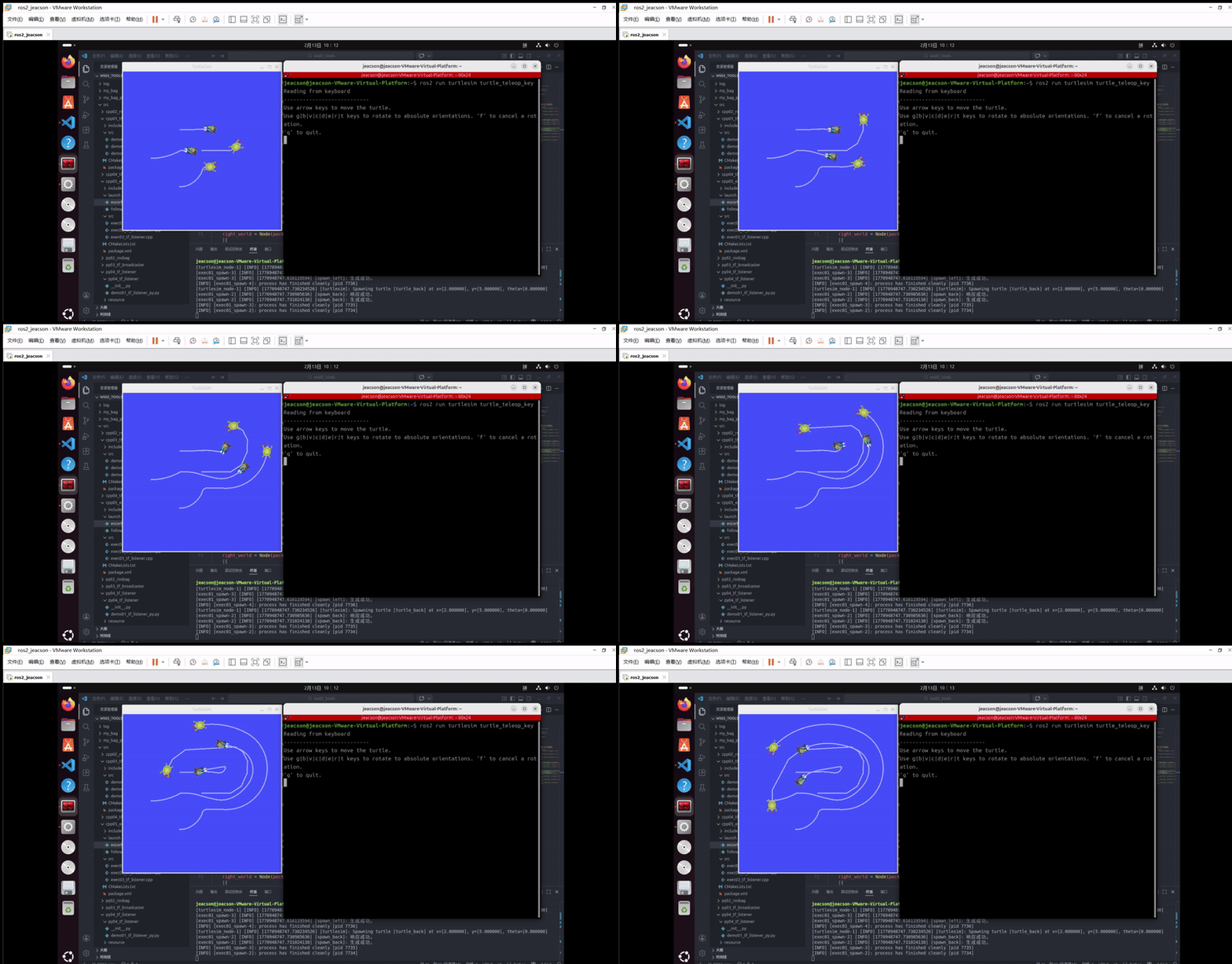
ros2 run turtlesim turtle_teleop_keyIn that terminal you can drive the native turtle with the keyboard, and the other three turtles follow the native turtle. The final result looks like this:
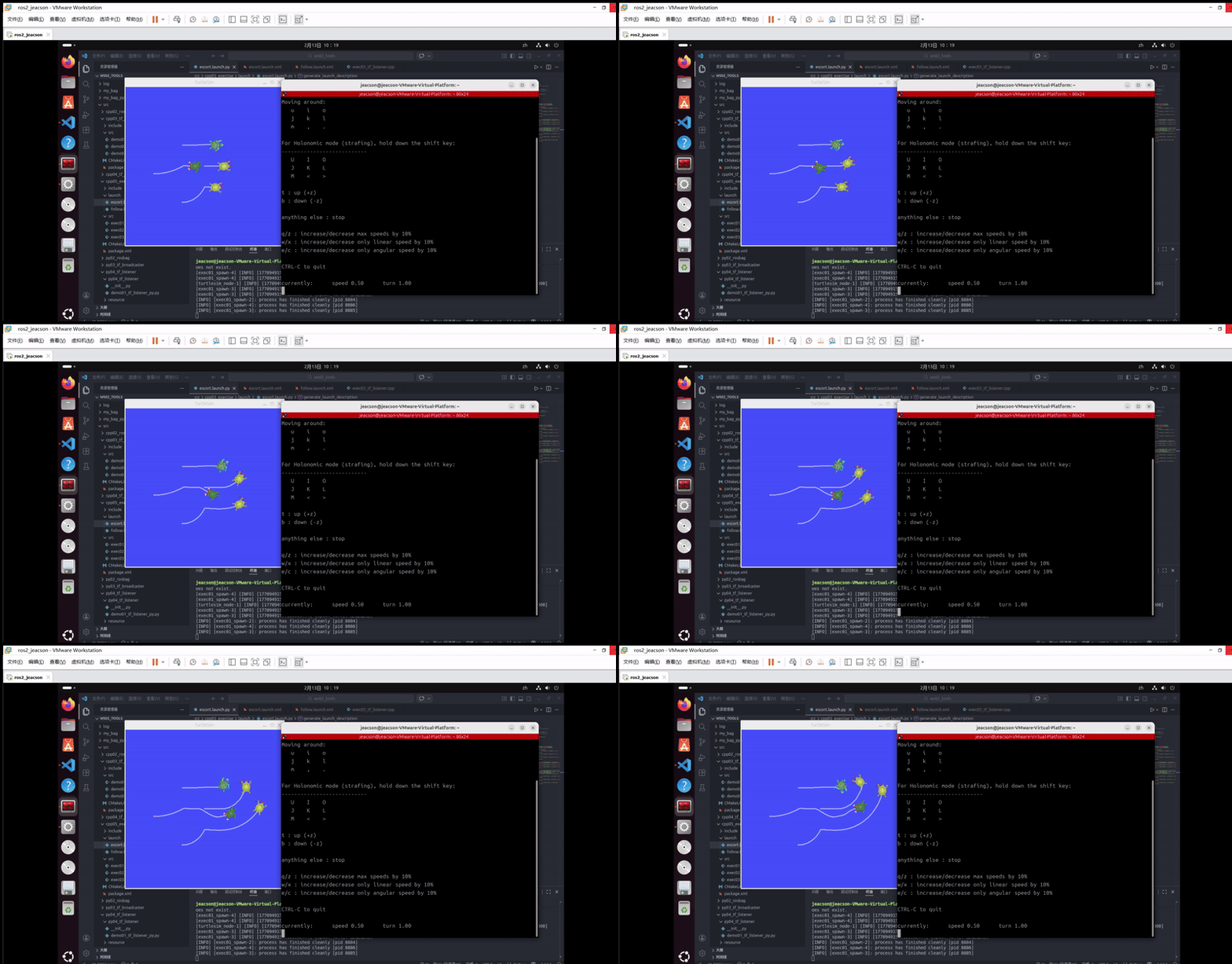
Of course, you may find that the native turtle moves too fast and the other three can't keep up.
In that case you can use a different control node:
ros2 run teleop_twist_keyboard teleop_twist_keyboard --ros-args --remap /cmd_vel:=/turtle1/cmd_velThe result looks like this:
Important
This article was translated by Hermes Agent; the original text can be found at here. The translation is for reference only. Translation time: 2026-11-05