
ROS2-019-ROS2 Tools: rosbag2
Overview
Suppose you have a robot:
- It runs fine day to day, but one time it suddenly throws an error. You want to dig into it right away, but the error only happened once — run it again and there is nothing.
- You redesigned a motion control node for it, but you can't get some of its specific parameters dialled in. Running it straight in the real environment might turn up something unexpected.
- In one navigation experiment you happened to get a navigation path, and you wish there were some tool to save it, so you could reproduce the result later.
For keeping data around and reading it back, ROS2 provides a dedicated tool — rosbag2
Concept and purpose
rosbag2 is the core tool suite for recording and replaying the data that nodes exchange in a ROS2 system. Simply put, it is like a "data logger" and a "data player" made for robot systems. We will be using it in a virtual machine.
How to use it
0. Prerequisites
Create the package first:
ros2 pkg create cpp02_rosbag --build-type ament_cmake --dependencies rclcpp rosbag2_cpp geometry_msgs --node-name demo01_writerros2 pkg create py02_rosbag --build-type ament_python --dependencies rclpy rosbag2_py geometry_msgs --node-name demo01_writer_py1. The command-line tool's basic syntax
In a terminal, you can use the ros2 bag command tool to record and replay data. Its basic syntax is:
burst    precisely control the playback process
convert  given a bag file, write out a new bag file with a different configuration;
info     output information about the bag file;
list     output information about the available plugins;
play     play back the data of a bag file;
record   record the data of a bag file;
reindex  rebuild a bag's metadata file.
You can see its help with the --help suffix; below I'll also walk through a case.
The case
Suppose you have already started a turtlesim_node node and a keyboard teleop node in two separate terminals:
ros2 run turtlesim turtlesim_noderos2 run turtlesim turtle_teleop_keyThe task: while it moves, have the speed and steering commands you type through turtle_teleop_key written by the ros2 bag tool into that folder path, so that the turtlesim_node node can reproduce the movement path by reading specific files in that folder.
Doing it
1. Record first
On top of what you have, open another terminal, C, and create a folder for storing the bag:
cd
mkdir ros2_bag
Move into that folder, then use ros2 bag record to start recording the commands:
cd ros2_bag/
ros2 bag record /turtle1/cmd_vel -o bag_cmd_vel
The record syntax
In the code above:
ros2 bag record /turtle1/cmd_vel -o bag_cmd_vel
#          ↑          ↑           ↑       ↑
#set subcommand = record     \           \      /
# the topic to record↗           /      \
# specify the output (pairs with the line below) ---------↗       /
# specify the output path & name (pairs with the line above; if omitted, a timestamped filename goes to the bash working directory)
You can see the details with --help; here it is only a quick introduction.
In terminal B you can drive the turtle with the keyboard, and ros2 bag will record the turtle's current speed and direction.

After that you can stop recording in terminal C with ctrl+c.
Only ever drive the turtle with the arrow keys!
When you drive the turtle with the keyboard in terminal B, you will see this message:
...
Use g|b|v|c|d|e|r|t keys to rotate to absolute orientations.
...
It is telling you that you can rotate the turtle to absolute orientations with these keys. But please note — do not use these keys to rotate the turtle directly!
Because rotating the turtle to an absolute angle with g|b|v|c|d|e|r|t calls the /turtle1/teleport_absolute service, and unless it is set up specially, the turtle's rotation cannot be recorded.
When the recording finishes, you will see a new folder created under ~/ros2_bag:
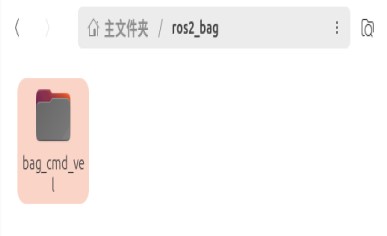
Two files are created in that folder:
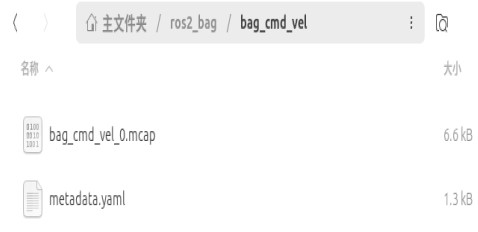
Where:
metadata.yamlis a source file storing some source information about thebagwe recordedbag_cmd_vel_0.mcapis an open-source binary container format designed for robot data recording; compared with the older database files that used the.db3format, it has the edge in concurrency and streaming.If you still need a database file in
.db3formatIf some downstream tool doesn't support
.mcapyet, or a particular situation still needs.db3, you can specify it with an argument:ros2 bag record /turtle1/cmd_vel --storage sqlite3
After that we can use these two files to play it back.
2. Play it back afterwards
In terminal A, shut down the node that is running first, then restart it.
With the node still running in terminal A, open another terminal, D, and enter:
ros2 bag play bag_cmd_velThe play syntax
The play command is quite simple; in the code above:
ros2 bag play bag_cmd_vel
#          ↑          ↑
#set subcommand = play      /
# specify the input path & name ↗
You can see the details with --help; here it is only a quick introduction.
Now the ros2 bag command sends the turtle's recorded speed and direction back to the turtle, and has it draw them again:

If you want to see information about a particular bag, you can run this in the bag's path:
ros2 bag info bag_cmd_velThat gives you information including its version, recording length and storage size:
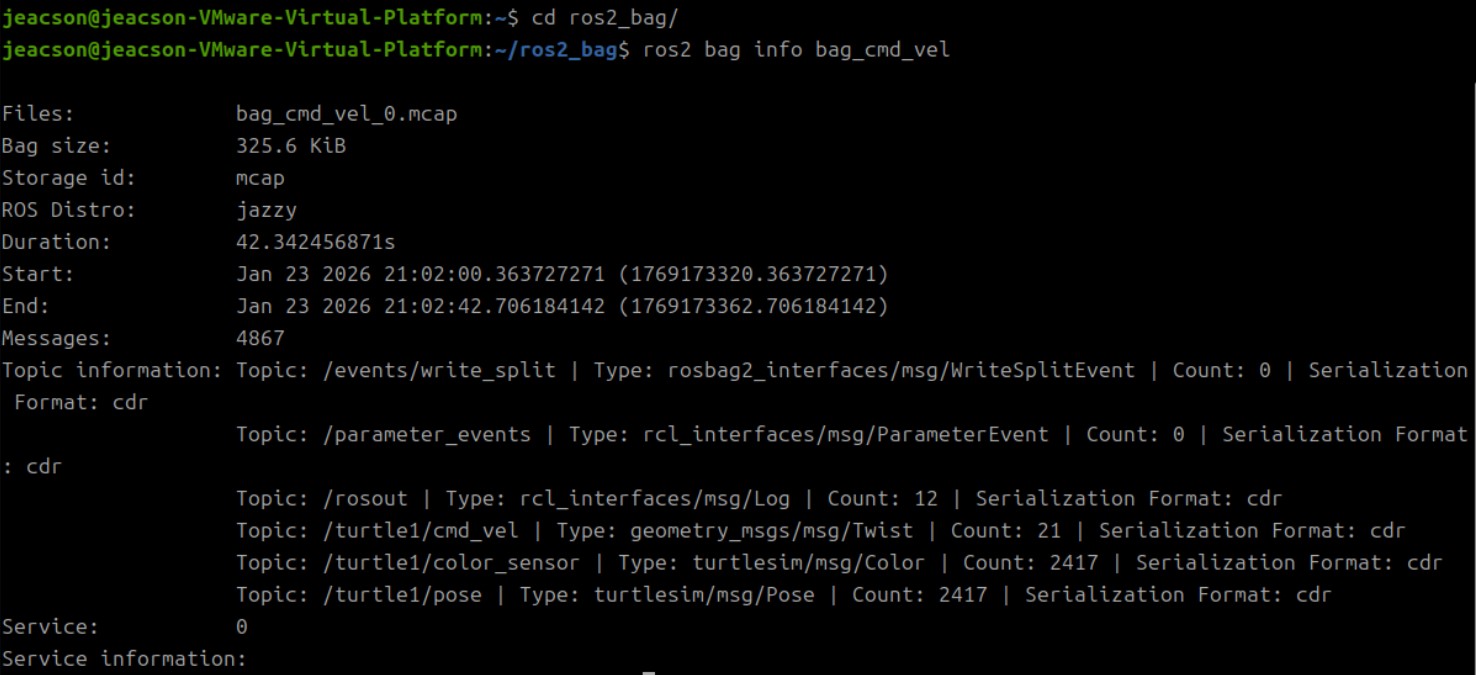
2. Using rosbag2 programmatically
Sometimes we also need to use rosbag2 programmatically; below I'll go through that with a case as well:
Suppose there is a folder path ~/ros2_bag available for storing bags. The task: start a turtlesim_node node and a keyboard teleop node:
ros2 run turtlesim turtlesim_noderos2 run turtlesim turtle_teleop_keyThe task: while it moves, have the speed and steering commands that are input written by ros2 bag into that folder path, so that after the turtlesim_node node is restarted it can reproduce the movement path by reading specific files in that folder.
①. Serialization (recording)
Serialization is really just recording a bag file. Its core implementation has three steps:
- Create the writer object (pointer)
- Set the target file path to write to
- Write the messages
In the demo01_writer.cpp file you created, write the following code:
/*
    Requirement: record the velocity commands of the moving turtle
    Steps:
        1. Include the header files;
        2. Initialize the ROS2 client
        3. Define a custom node class:
           3-1. Create a recorder object
           3-2. Set the disk file
           3-3. Write data (create a velocity subscriber, write in the callback)
        4. Call the spin function, passing in the node object pointer
        5. Release resources.
 */

// 1. Include the header files;
#include "rclcpp/rclcpp.hpp"
#include "geometry_msgs/msg/twist.hpp"
#include "rosbag2_cpp/writer.hpp"

// 3. Define a custom node class:
class SimpleBagRecorder: public rclcpp::Node{
    public:
        SimpleBagRecorder() : Node("simple_bag_recorder_node_cpp"){
            RCLCPP_INFO(this->get_logger(), "Message recorder object created");
            // 3-1. Create a recorder object
            writer_ = std::make_unique<rosbag2_cpp::Writer>();

            // 3-2. Set the disk file
            writer_->open("my_bag"); // --this path is relative; it is a direct child of the workspace

            // 3-3. Write data (create a velocity subscriber, write in the callback)
            // writer_->write()
            sub_ = this->create_subscription<geometry_msgs::msg::Twist>("/turtle1/cmd_vel", 10, std::bind(&SimpleBagRecorder::do_write_msg, this, std::placeholders::_1));
        }
    private:
        void do_write_msg(std::shared_ptr<rclcpp::SerializedMessage> msg){
            // write(std::shared_ptr<rclcpp::SerializedMessage> message, // the message being written
            // const std::string &topic_name, // the topic name
            // const std::string &type_name, // the message type being written
            // const rclcpp::Time &time) // the timestamp
            RCLCPP_INFO(this->get_logger(), "Writing data...");
            writer_->write(msg, "/turtle1/cmd_vel", "geometry_msgs/msg/Twist", this->now());
        }
        std::unique_ptr<rosbag2_cpp::Writer> writer_;
        // The pointer should correspond to exactly one object; once the pointer is destroyed, the object must be released right away.
        // So that this "needs to touch disk files" object doesn't leak memory

        rclcpp::Subscription<geometry_msgs::msg::Twist>::SharedPtr sub_;

};

int main(int argc, char *argv[])
{
    // 2. Initialize the ROS2 client
    rclcpp::init(argc, argv);
    // 4. Call the spin function, passing in the node object pointer.
    rclcpp::spin(std::make_shared<SimpleBagRecorder>());
    // 5.Release resources;
    rclcpp::shutdown();
    return 0;
}In the demo01_writer_py.py file you created, write the following code:
"""
  Requirement: record the velocity commands published by the turtle_teleop_key node.
  Steps:
    1. Import the packages;
    2. Initialize the ROS client;
    3. Define the node class;
      3-1. Create the writer object;
      3-2. Set the target file, topic and other parameters to write to;
      3-3. Write the messages.
    4. Call the spin function, passing in the object;
    5. Release resources.

"""
# 1. Import the packages;
import rclpy
from rclpy.node import Node
from rclpy.serialization import serialize_message
from geometry_msgs.msg import Twist
import rosbag2_py
from rclpy.logging import get_logger
# 3. Define the node class;
class SimpleBagRecorder(Node):
    def __init__(self):
        super().__init__('simple_bag_recorder_py')
        # 3-1. Create the writer object;
        self.writer = rosbag2_py.SequentialWriter()
        # 3-2. Set the target file, topic and other parameters to write to;
        storage_options = rosbag2_py.StorageOptions(
            uri='my_bag_py',
            storage_id='mcap')
        converter_options = rosbag2_py.ConverterOptions('', '')
        self.writer.open(storage_options, converter_options)

        topic_info = rosbag2_py.TopicMetadata(
            id=0,
            name='/turtle1/cmd_vel',
            type='geometry_msgs/msg/Twist',
            serialization_format='cdr')
        self.writer.create_topic(topic_info)
        self.get_logger().info("Bag created, setting up the subscription...")

        self.subscription = self.create_subscription(
            Twist,
            '/turtle1/cmd_vel',
            self.topic_callback,
            10)
        self.subscription

    def topic_callback(self, msg):
        self.get_logger().info("Message received by the node!")
        # 3-3. Write the messages.
        self.writer.write(
            '/turtle1/cmd_vel',
            serialize_message(msg),
            self.get_clock().now().nanoseconds)


def main(args=None):
    # 2. Initialize the ROS client;
    rclpy.init(args=args)
    # 4. Call the spin function, passing in the object;
    sbr = SimpleBagRecorder()
    rclpy.spin(sbr)
    # 5. Release resources.
    rclpy.shutdown()


if __name__ == '__main__':
    main()
②. Deserialization (reading)
Deserialization is really just reading a bag file. Its core implementation has four steps:
- Create the reader object pointer
- Set the target file to read
- Read the messages
- Close the file
In the demo02_readter.cpp file you created, write the following code:
/*
    Requirement: read the data of a bag file and output the data to the terminal
    Steps:
        1. Include the header files;
        2. Initialize the ROS2 client
        3. Define a custom node class:
           3.1 Create a player object;
           3.2 Set the file to be read;
           3.3 Read the messages;
           3.4 Close the file.
        4. Call the spin function, passing in the node object pointer
        5. Release resources.
 */

// 1. Include the header files;
#include "rclcpp/rclcpp.hpp"

#include "rosbag2_cpp/reader.hpp"
#include "geometry_msgs/msg/twist.hpp"

// 3. Define a custom node class:
class SimpleBagPlay: public rclcpp::Node{
    public:
        SimpleBagPlay() : Node("simple_bag_rplay_node_cpp"){
            RCLCPP_INFO(this->get_logger(), "Message player object created");
            int counter = 0;
            // 3.1 Create a player object;
            reader_ = std::make_unique<rosbag2_cpp::Reader>();
            // 3.2 Set the file to be read;
            reader_->open("my_bag");

            // 3.3 Read the messages in a loop;
            while (reader_->has_next())
            {
                auto twist = reader_->read_next<geometry_msgs::msg::Twist>();
                RCLCPP_INFO(this->get_logger(), "linear velocity: %.2f, angular velocity: %.2f", twist.linear.x, twist.angular.z);
                counter++;
            }

            // 3.4 Close the file.
            reader_->close();

            RCLCPP_INFO(this->get_logger(), "total message count: %d", counter);
        }

    private:
        std::unique_ptr<rosbag2_cpp::Reader> reader_;

};

int main(int argc, char *argv[])
{
    // 2. Initialize the ROS2 client
    rclcpp::init(argc, argv);
    // 4. Call the spin function, passing in the node object pointer.
    rclcpp::spin(std::make_shared<SimpleBagPlay>());
    // 5.Release resources;
    rclcpp::shutdown();
    return 0;
}In the demo02_readter_py.py file you created, write the following code:
"""
    Requirement: read the data of a bag file.
    Steps:
        1. Import the packages;
        2. Initialize the ROS client;
        3. Define the node class;
            3-1. Create the reader object;
            3-2. Set the target file, topic and other parameters to read;
            3-3. Read the messages;
            3-4. Close the file.
        4. Call the spin function, passing in the object;
        5. Release resources.

"""
# 1. Import the packages;
import rclpy
from rclpy.node import Node
import rosbag2_py
from rclpy.logging import get_logger
# 3. Define the node class;
class SimpleBagPlayer(Node):
    def __init__(self):
        super().__init__('simple_bag_player_py')
        # 3-1. Create the reader object;
        self.reader = rosbag2_py.SequentialReader()
        # 3-2. Set the target file, topic and other parameters to read;
        storage_options = rosbag2_py.StorageOptions(
                uri="my_bag_py",
                storage_id='mcap')
        converter_options = rosbag2_py.ConverterOptions('', '')
        self.reader.open(storage_options,converter_options)

    def read(self):
        # 3-3. Read the messages;
        while self.reader.has_next():
            msg = self.reader.read_next()
            get_logger("rclpy").info("topic = %s, time = %d, value=%s" % (msg[0], msg[2], msg[1]))

def main(args=None):
    # 2. Initialize the ROS client;
    rclpy.init(args=args)

    # 4. Call the spin function, passing in the object;
    reader = SimpleBagPlayer()
    reader.read()
    rclpy.spin(reader)
    # 5. Release resources.
    rclpy.shutdown()


if __name__ == '__main__':
    main()
③. Editing the config file
Edit CMakeLists.txt in the cpp02_rosbag package:
...

add_executable(demo01_writer src/demo01_writer.cpp)
add_executable(demo02_reader src/demo02_reader.cpp)

target_include_directories(demo01_writer PUBLIC
  $<BUILD_INTERFACE:${CMAKE_CURRENT_SOURCE_DIR}/include>
  $<INSTALL_INTERFACE:include/${PROJECT_NAME}>)

target_include_directories(demo02_reader PUBLIC
  $<BUILD_INTERFACE:${CMAKE_CURRENT_SOURCE_DIR}/include>
  $<INSTALL_INTERFACE:include/${PROJECT_NAME}>)

target_compile_features(demo01_writer PUBLIC c_std_99 cxx_std_17)  # Require C99 and C++17
target_compile_features(demo02_reader PUBLIC c_std_99 cxx_std_17)  # Require C99 and C++17

ament_target_dependencies(
  demo01_writer
  "rclcpp"
  "rosbag2_cpp"
  "geometry_msgs"
)

ament_target_dependencies(
  demo02_reader
  "rclcpp"
  "rosbag2_cpp"
  "geometry_msgs"
)

install(TARGETS demo01_writer demo02_reader
  DESTINATION lib/${PROJECT_NAME})
...Edit setup.py in the py02_rosbag package:
...
    entry_points={
    'console_scripts': [
        'demo01_writer_py = py02_rosbag.demo01_writer_py:main',
        'demo02_reader_py = py02_rosbag.demo02_reader_py:main'
        ],
    },
④. Build
Just build with colcon build --packages-select cpp02_rosbag.
Just build with colcon build --packages-select py02_rosbag.
⑤. Run
After starting a turtlesim_node node and a keyboard teleop node in terminal A and terminal B respectively, run the code:
ros2 run cpp02_rosbag demo01_writerros2 run py02_rosbag demo01_writer_pyWhen you drive the turtle with the keyboard in terminal B, the code you just ran records the turtle's current speed and direction.
After that you can stop recording in terminal C with ctrl+c.

In terminal A, shut down the node that is running first, then restart it.
With the node still running in terminal A, open another terminal D and enter:
ros2 run cpp02_rosbag demo02_readerros2 run py02_rosbag demo02_reader_pyterminal D now outputs the relevant data from the corresponding bag to the terminal the way the code is written to.


If you need to record synthetic data coming from the node itself
The code above only briefly introduces the ordinary setup of "creating something purely for saving topic data and its processing results"; its associated information gets its timestamps from the timer inside the particular topic. If you need to use rosbag2's APIs from a node via "a timer you create yourself", you can refer to the official C++ approach and Python approach. Using rclcpp::Node::create_wall_timer() and rclpy.node.create_timer(), they create a timer that can take a callback.
Important
This article was translated by Hermes Agent; the original text can be found at here. The translation is for reference only. Translation time: 2026-11-05