
ROS2-017-ROS2 Tools: The Python Implementation of the launch File
Overview
For an introduction to launch files, see the previous post
Python syntax
Here is the syntax for launch files in Python:
1. Node setup: Node
In a launch file written in Python, the nodes to be executed all have to be wrapped as launch_ros.actions.Node objects and returned inside a wrapper object created by the LaunchDescription() function. Below I go through the arguments of that wrapped Node object.
Suppose the file name of the launch file is "py02_node_launch.py" and its package is "package_for_launch_01"; the launch file can be written as follows:
# py02_node_launch.py
from launch import LaunchDescription
from launch_ros.actions import Node

# Get the share directory path of the package------
from ament_index_python.packages import get_package_share_directory
import os

def generate_launch_description():
    # Example node config
    turtle1 = Node(

        # Executable
        executable="turtlesim_node",

        # Package name
        package="turtlesim",

        # Whether the node restarts automatically (set to True here)
        respawn=True,

        # Override the node name
        name="t1",

        # Set the namespace
        namespace="/robot1",

        # Process display name (visible in ps/top)
        exec_name="turtle_sim",

        # Parameter config
        parameters=[
            {"background_r": 255, "background_g": 0, "background_b": 0},  # Pass parameters as a dict
            os.path.join(get_package_share_directory("package_for_launch_01"), "config", "custom_params.yaml" ) # Pass parameters via a YAML file (common, recommended)
        ],

        # Remapping config
        remappings=[
            ("/turtle1/cmd_vel", "/robot1/cmd_vel"),  # Topic remap
            ("/turtle1/pose", "/robot1/pose")
        ],

        # ROS-specific arguments
        ros_arguments=[
            "--log-level", "debug",  # Set the log level
            "--ros-args", "-p", "use_sim_time:=true"  # Override a parameter (--ros-args must be added explicitly)
        ],

        # Ordinary command-line arguments
        arguments=[
            "--custom-flag",  # Custom flag
            "--config", "/path/to/non_ros_config.json"
        ]
    )

    return LaunchDescription([turtle1])
Where:
- executable: the executable
- package: the name of the package the executable belongs to
- respawn: whether the node restarts automatically (for special nodes — say one that needs to come back up after an exception shuts it down — you can use this)
- name: sets the node name, which can be used to get around duplicate names
- namespace: sets the namespace, which can also be used to get around duplicate names
- exec_name: sets the label shown on the left of the command line while the program is running
- remappings: used to remap topics
- parameters
- ros_arguments
- arguments
The difference between "parameters"/"ros_arguments"/"arguments"
In the initializer above that creates the Node object, three of the arguments have "parameter" in their meaning. They mean, respectively:
- parameters: the parameters the node itself needs to read when it runs — think of them as the "arguments" you pass to an ordinary function call
- ros_arguments: the ROS-specific arguments that ROS2's underlying system needs to read when the node runs (renaming the node, namespaces, loading parameter files, and so on).
- arguments: the ordinary application-level command-line arguments the executable needs to read when the node runs, unrelated to ROS itself (a custom config file path, debug flags, and so on)
Concretely, the three actually differ like this:
- parameters:
- parameters that the node itself needs to read; usually used to pass parameters to the node
- it supports defining a dict directly (e.g.
{"key": value}) or pointing at a YAML/JSON file path (more common); - underneath, it auto-generates a
--params-fileargument and triggers the ROS middleware to parse it; - the parameters can be changed on the fly with the
ros2 paramcommand or a ROS service, and type inference is supported (integers, floats, strings and so on are recognized automatically).
- ros_arguments:
- the ROS-specific arguments that ROS2's underlying system needs to read; usually also used to override the parameters originally given to a node, for debugging
- if you do the equivalent on the command line, the values passed here get wrapped behind the
--ros-argsflag so the ROS middleware parses them forcibly; - ROS argument syntax is supported (e.g.
--log-level,__ns,--remap).
- arguments:
- the ordinary application-level command-line arguments the executable needs to read, unrelated to ROS itself
- they are appended straight onto the end of the node's command line;
- they do not trigger any special handling by the ROS argument parser (
rclcpp::init).
Laid out as a table, the differences are:
| Feature | parameters | ros_arguments | arguments |
|---|---|---|---|
| Scope | Parameters the node uses itself at runtime | ROS middleware config inside ROS2's underlying system | Process-level command-line arguments for the executable in the outside environment |
| Typical use | Algorithm and control parameters the node uses itself at runtime | Remapping topics, namespaces, log level | Specifying a config file, debug mode |
| Can it be changed at runtime | ✅ (via the ROS interface) | ❌ (fixed at launch) | ❌ (fixed at launch) |
| Typical syntax | {"key": value} or params.yaml | ["--remap", "old:=new"] | ["--config", "my_config.txt"] |
| Underlying flag | --params-file | --ros-args | no special flag |
| Precedence rule | lower than ros_arguments | higher, but lower than ROS command-line arguments | separate scope |
| Priority when actually passing parameters to a node | use this first when feeding parameter data into a node | use it only when you need to override parameters | not needed |
So in practice the usual advice is:
- Prefer
parametersfor managing a node's runtime configuration (type-safe, adjustable on the fly); - use
ros_argumentsonly when you need to override parameters; - avoid passing ROS-related arguments in
arguments(it easily breaks parsing).
As described above, when passing parameters with parameters, if there are too many of them the {"key": value} approach becomes very awkward.
So when passing parameters through parameters, we in fact more often pass them in a yaml file.
For consistent formatting and so the code still compiles as-is, we usually create a properly formatted yaml file in the following steps: (assuming bash is at the workspace root)
Start the node described above first
. install/setup.bash
ros2 launch py01_launch py02_node_launch.py
In the same directory, open another terminal and enter:
ros2 param dump /robot1/t1 > src/package_for_launch_01/config/custom_params.yamlA
custom_params.yamlfile now appears undersrc/package_for_launch_01/configin the workspace root, but this YAML file still can't be used directly.Just as when we added the
launchfiles, we need to add the following line at the👈spot inCMakeLists.txt:...... find_package(rclcpp REQUIRED) install(DIRECTORY launch config DESTINATION share/${PROJECT_NAME}) 👈 if(BUILD_TESTING) ......Build:
colcon build --pakages-select package_for_launch_01Finally, import the
get_package_share_directoryfunction to get at runtime the path of thesharefolder under this package's name inside theinstalldirectory, then join it with theconfigandcustom_params.yamlpath information:# Get the share directory path of the package------ from ament_index_python.packages import get_package_share_directory import os ... # Get the path dynamically when configuring parameters parameters=[ os.path.join(get_package_share_directory("package_for_launch_01"), "config", "custom_params.yaml" ) # Pass parameters via a YAML file (common, recommended) ],
2. Command setup: ExecuteProcess
In a launch file written in Python, to wrap external processes such as ROS2 commands — so that part of the work can be fired off with a simple call — you need objects wrapped as launch.actions.ExecuteProcess, returned inside a wrapper object created by the LaunchDescription() function.
Below I go through the arguments of that wrapped ExecuteProcess object.
Suppose the file name of the launch file is "py03_cmd_launch.py" and its package is "package_for_launch_01"; the launch file can be written as follows:
from launch import LaunchDescription
from launch_ros.actions import Node

# Classes for wrapping terminal commands------
from launch.actions import ExecuteProcess
from launch.substitutions import FindExecutable

"""
Requirement: start the turtlesim_node node and run a command to get the turtle's pose information
"""

def generate_launch_description():

    turtle = Node(
        package="turtlesim",
        executable="turtlesim_node",

    )

    # Wrap the command
    cmd = ExecuteProcess(
        # Way 1: pass the command as one string
        # cmd=["ros2 topic echo /turtle1/pose"],
        # Way 2: pass the command in parts (works)
        # cmd=["ros2 topic", "echo", "/turtle1/pose"],
        # Way 3: wrap the command with a function (recommended)
        cmd=[FindExecutable(name="ros2"),"topic", "echo", "/turtle1/pose"],

        output = "both", # Log to both the disk file and the terminal
        shell = True # Run the command as a terminal command
    )

    return LaunchDescription([turtle,cmd])
Wrapping the command with the FindExecutable function is not overkill
The three ways of filling in ExecuteProcess's cmd argument each have their own pros and cons:
- Passing the command as one string sends the whole command off as a single string; it is simple and obvious, but you can't change parameters at runtime;
- Passing the command in parts separates the arguments, so it is easier to modify than the single string, but it assumes the executable's location is in the
system PATH environment variable; - Wrapping it with a function only wraps the leading
ros2bit, butFindExecutable()lets ros2 look up the executable's location at runtime — even if that location differs between dev, production and container environments, or several ROS2 versions are installed in the same environment, the command still runs, adapting itself to most environments and complicated deployment setups.
3. Argument setup: DeclareLaunchArgument&LaunchConfiguration
Argument setup is mainly about two things: declaring an argument and calling it. Declaring is wrapped as launch.actions.DeclareLaunchArgument; calling it is wrapped as launch.substitutions import LaunchConfiguration.
Suppose the file name of the launch file is "py04_args_launch.py" and its package is "package_for_launch_01"; the launch file can be written as follows:
from launch import LaunchDescription
from launch_ros.actions import Node

# Declaring and getting arguments------
from launch.actions import DeclareLaunchArgument
from launch.substitutions import LaunchConfiguration

"""
Requirement: change turtlesim_node's background color dynamically when the launch file starts
Implementation:
    1. Declare the arguments (variables);
    2. Call the arguments (variables);
    3. Pass the arguments in dynamically when the launch file runs
"""

def generate_launch_description():
    # 1. Declare the arguments (variables);
    decl_bg_r = DeclareLaunchArgument(name="bg_r",default_value="255")
    decl_bg_g = DeclareLaunchArgument(name="bg_g",default_value="25")

    # 2. Call the arguments (variables);
    turtle = Node(
        package="turtlesim",
        executable="turtlesim_node",
        parameters=[{
            "background_r": LaunchConfiguration(variable_name="bg_r"),
            "background_g": LaunchConfiguration(variable_name="bg_g")
        }]
    )
    return LaunchDescription([decl_bg_r,
                              decl_bg_g,
                              turtle])
In the code above, to declare the arguments we used the DeclareLaunchArgument() function to create several objects. In them:
- name: the argument name;
- default_value: the default value.
Afterwards, when creating the Node object, we pass the argument name above into parameters through the LaunchConfiguration() function. That way, when the launch file runs, we can pass arguments in dynamically from bash:
ros2 launch cpp01_launch py04_args_launch.py bg_r:=100 bg_g:=86Of course, if you don't pass anything in, the file falls back on the default_value that was given when the argument was declared.
The argument name used for dynamic passing is a separate thing
When passing arguments in dynamically from bash, note that the name you pass must be the same as the name used inside the name argument when the argument was declared, and not the same as the argument name itself.
4. File inclusion: IncludeLaunchDescription&PythonLaunchDescriptionSource
File inclusion mainly means the operation of including one launch file inside another launch file. The APIs needed are launch.actions.IncludeLaunchDescription & PythonLaunchDescriptionSource.
Suppose the file name of the launch file is "py05_include_launch.py" and its package is "package_for_launch_01", and it wants to call the launch file used in the argument setup above; it can be written as follows:
from launch import LaunchDescription
from launch_ros.actions import Node
import os
# File inclusion------
from launch.actions import IncludeLaunchDescription
from launch.launch_description_sources import PythonLaunchDescriptionSource
# Get the share directory path of the package------
from ament_index_python.packages import get_package_share_directory
"""
    Requirement: include other launch files in the current launch file

"""
def generate_launch_description():
    include = IncludeLaunchDescription(
        launch_description_source=PythonLaunchDescriptionSource(
            launch_file_path=os.path.join(
                get_package_share_directory("cpp01_launch"),
                "launch",
                "py",
                "py04_args_launch.py"
            )
        )
    )
    return LaunchDescription([include])
That way the earlier launch file gets called at runtime.
Of course, called this way the launch file uses the default_values that were used inside the original file. If you need to change the arguments, the code above can be changed to:
...
"""
    Requirement: include other launch files in the current launch file and pass specific arguments in

"""
def generate_launch_description():
    include = IncludeLaunchDescription(
        launch_description_source=PythonLaunchDescriptionSource(
            launch_file_path=os.path.join(
                get_package_share_directory("cpp01_launch"),
                "launch",
                "py",
                "py04_args_launch.py"
            )
        ),launch_arguments=[("bg_r", "80"),("bg_g", "100")] #👈NEW!
    )
    return LaunchDescription([include])
Watch out when setting argument names
When defining arguments through launch_arguments inside the IncludeLaunchDescription() function, you must use the corresponding name that was set in the original launch file's DeclareLaunchArgument() function, otherwise it won't be recognized
5. Node grouping: GroupAction&PushRosNamespace
To make nodes easier to manage in a launch file, we can group them. The APIs needed are launch.actions.GroupAction & launch_ros.actions.PushRosNamespace. In them:
- GroupAction: the core API for grouping
- PushRosNamespace: sets the namespace for the current group
Suppose the file name of the launch file is "py06_group_launch.py" and its package is "package_for_launch_01"; the launch file can be written as follows:
from launch import LaunchDescription
from launch_ros.actions import Node
# Grouping------
from launch_ros.actions import PushRosNamespace
from launch.actions import GroupAction

"""
    Requirement: create 3 turtlesim_node nodes, put the first two in the same group and the third in a group of its own
"""
def generate_launch_description():
    # Create 3 turtlesim_node nodes
    t1 = Node(
        package="turtlesim",
        executable="turtlesim_node",
        name="t1"
    )
    t2 = Node(
        package="turtlesim",
        executable="turtlesim_node",
        name="t2"
    )
    t3 = Node(
        package="turtlesim",
        executable="turtlesim_node",
        name="t3"
    )
    # Grouping
    # Set the current group's namespace and the nodes it contains
    g1 = GroupAction(actions=[PushRosNamespace("g1"), t1, t2])
    g2 = GroupAction(actions=[PushRosNamespace("g2"), t3])
    return LaunchDescription([g1, g2])
Then when that launch file runs, you just open another terminal and type ros2 node list in bash to see how these nodes are grouped:
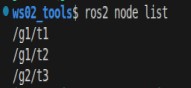
What if you used namespace when creating the Node object...
Suppose that, on the basis of the original code, t1 is changed to:
...
t1 = Node(
        package="turtlesim",
        executable="turtlesim_node",
        name="t1",
        namespace="extra1" # 👈NEW!
    )
...
Then when that launch file runs, the Node grouping becomes:
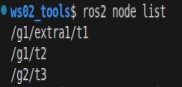
Essentially it just stacks one more namespace on the given Node, like this = =
6. Event triggers: RegisterEventHandler&OnProcessStart&OnProcessExit
When you run nodes with a luanch file, the nodes fire different events while they run. We can use some APIs to register some handling logic for them.
The APIs involved are:
- launch.actions.RegisterEventHandler registers an event
- launch.event_handlers.OnProcessStart fires when the node is created
- launch.event_handlers.OnProcessExit fires when the node is about to be destroyed
In the code below we combine it with the command setup described above and wrap it into the API.
from launch import LaunchDescription
from launch_ros.actions import Node
# Classes for wrapping terminal commands------
from launch.actions import ExecuteProcess
# Events------
from launch.event_handlers import OnProcessStart, OnProcessExit
from launch.actions import RegisterEventHandler, LogInfo
"""
    Requirement: bind events to turtlesim_node
        One: when the node starts, run the "spawn a new turtle" program
        Two: when the node shuts down, do a log output
"""
def generate_launch_description():
    turtle = Node(
        package="turtlesim",
        executable="turtlesim_node"
    )
    # Suppose the code you want to wrap is:
    # ros2 service call /spawn turtlesim/srv/Spawn "{'x':8.0, 'y':3.0}"
    # then it can be written as:
    spawn = ExecuteProcess(
        cmd=["ros2 service call /spawn turtlesim/srv/Spawn \"{'x':8.0, 'y':3.0}\""],
        output="both",
        shell=True
    )
    # Register event 1
    event_start = RegisterEventHandler(
        event_handler=OnProcessStart(
            target_action=turtle,
            on_start=spawn
        )
    )
    # Register event 2
    event_exit = RegisterEventHandler(
        event_handler=OnProcessExit(
            target_action=turtle,
            on_exit=[LogInfo(msg="turtlesim_node has exited")]
        )
    )

    return LaunchDescription([turtle, event_start, event_exit])
The code above registers a start event (event 1) and an exit event (event 2) for the turtle node: once turtle starts, spawn runs; when turtle exits, it outputs the log text: "turtlesim_node has exited". In them:
The RegisterEventHandler object registers events; its arguments are:
event_handler: the event object being registered.
OnProcessStart is the start-event object; its arguments are:
target_action: the target object the event is registered on;on_start: the logic to run when the event fires.
OnProcessExit is the exit-event object; its arguments are:
target_action: the target object the event is registered onon_exit: the logic to run when the event fires
LogInfo is the log-output object; its argument is:
msg: the log message to output.
Summary
In this post I went into reasonable detail on the topic of "how to write launch files with pyhton". Unless you want to write only in C++, since XML & YAML have no event-trigger functions of their own to adapt, I don't recommend XML/YAML as the first language for writing launch files. If you do need them, see the next post and the official docs.
Important
This article was translated by Hermes Agent; the original text can be found at here. The translation is for reference only. Translation time: 2026-11-05