
ROS2-018-ROS2 Tools: The XML/YAML Implementation of the launch File
Overview
For an introduction to launch files, see this post
Unless you want to write only in C++, since XML & YAML have no event-trigger functions of their own to adapt, I personally don't recommend XML/YAML as the first language for writing launch files (even though they really are simpler to write = =). If you do need them, write the code alongside the official docs.
Since the code formats are similar, below I describe XML and YAML files together.
XML&YAML syntax
Here is the syntax for launch files in XML & YAML:
1. Node setup: node
In a launch file written in XML / YAML, the nodes to be executed all go into node tags.
In XML, suppose the file name of the launch file is "xml02_node_launch.xml" and its package is "package_for_launch_01"; the launch file can be written as follows:
<launch>
    <node pkg="turtlesim" exec="turtlesim_node" name="t1" namespace="robot1" exec_name="t1_label" respawn="true"/>
    <node pkg="turtlesim" exec="turtlesim_node" name="t2">
        <!-- <param name="background_r" value="255" />
            <param name="background_g" value="255" />
            <param name="background_b" value="255" /> -->
        <param from="$(find-pkg-share package_for_launch_01)/config/t2.yaml" />
    </node>
    <node pkg="turtlesim" exec="turtlesim_node" name="t3">
        <remap from="/turtle1/cmd_vel" to="/cmd_vel" />
    </node>
    <node pkg="turtlesim" exec="turtlesim_node" ros_args="--remap __name:=t4 --remap __ns:=/group_2" />
    <node pkg="rviz2" exec="rviz2" args="-d $(find-pkg-share package_for_launch_01)/config/my.rviz" />

</launch>In YAML, suppose the file name of the launch file is "yaml02_node_launch.yaml" and its package is "package_for_launch_01"; the launch file can be written as follows:
launch:
- node:
    pkg: "turtlesim"
    exec: "turtlesim_node"
    name: "t1"
    namespace: "robot1"
    exec_name: "t1_label"
    respawn: "false"
- node:
    pkg: "turtlesim"
    exec: "turtlesim_node"
    name: "t2"
    param:
    # -
    #   name: "background_r"
    #   value: 255
    # -
    #   name: "background_b"
    #   value: 255
    - from: "$(find-pkg-share package_for_launch_01)/config/t2.yaml"
- node:
    pkg: "turtlesim"
    exec: "turtlesim_node"
    remap:
    -
      from: "/turtle1/cmd_vel"
      to: "/cmd_vel"

- node:
    pkg: "turtlesim"
    exec: "turtlesim_node"
    ros_args: "--ros-args --remap __name:=t4 --remap __ns:=/t4"
- node:
    pkg: "rviz2"
    exec: "rviz2"
    args: "-d $(find-pkg-share package_for_launch_01)/config/my.rviz"
Where:
- exec: the executable
- pkg: the name of the package the executable belongs to
- respawn: whether the node restarts automatically (for special nodes — say one that needs to come back up after an exception shuts it down — you can use this)
- name: sets the node name, which can be used to get around duplicate names
- namespace: sets the namespace, which can also be used to get around duplicate names
- exec_name: sets the label shown on the left of the command line while the program is running
- args: the argument list used when calling the command
- ros_args: equivalent to args with the --ros-args prefix
The child tags of the node tag include:
- remap: used to remap topics; its attributes are:
- from: the original topic name
- to: the new topic name
- param: the tag for setting parameters; its attributes are:
- name: the parameter name
- value: the parameter value
- from: the parameter file path
As described in the Python implementation above, when passing parameters with param, if there are too many of them the <param name="xxx" value="yyy" /> approach becomes very awkward.
So when passing parameters through param, we in fact more often pass them in a yaml file.
For consistent formatting and so the code still compiles as-is, we usually create a properly formatted yaml file in the following steps: (assuming bash is at the workspace root)
Start the node described above first
. install/setup.bash
ros2 launch py01_launch py02_node_launch.py
In the same directory, open another terminal and enter:
ros2 param dump /robot1/t1 > src/package_for_launch_01/config/custom_params.yamlA
custom_params.yamlfile now appears undersrc/package_for_launch_01/configin the workspace root, but this YAML file still can't be used directly.Just as when we added the
launchfiles, we need to add the following line at the👈spot inCMakeLists.txt:...... find_package(rclcpp REQUIRED) install(DIRECTORY launch config DESTINATION share/${PROJECT_NAME}) 👈 if(BUILD_TESTING) ......Build:
colcon build --pakages-select package_for_launch_01Finally, import the
get_package_share_directoryfunction to get at runtime the path of thesharefolder under this package's name inside theinstalldirectory, then join it with theconfigandcustom_params.yamlpath information:
How to join them in XML:
...
<!-- Get the path dynamically when configuring parameters -->
<param from="$(find-pkg-share package_for_launch_01)/config/t2.yaml" />How to join them in YAML:
    ...
    # Get the path dynamically when configuring parameters
    param:
    - from: "$(find-pkg-share package_for_launch_01)/config/t2.yaml"
2. Command setup: executable
In a launch file written in XML / YAML, to wrap external processes such as ROS2 commands — so that part of the work can be fired off with a simple call — you need the executable tag. This is a bit simpler than in python.
In XML, suppose the file name of the launch file is "xml03_cmd_launch.xml" and its package is "package_for_launch_01"; the launch file can be written as follows:
<launch>
    <node pkg="turtlesim" exec="turtlesim_node" />
    <executable cmd="ros2 run turtlesim turtlesim_node" output="both" />
</launch>In YAML, suppose the file name of the launch file is "yaml03_cmd_launch.yaml" and its package is "package_for_launch_01"; the launch file can be written as follows:
launch:
- executable:
    cmd: "ros2 run turtlesim turtlesim_node"
    output: "both"
The executable tag represents an executable command; its attributes are:
- cmd: the command to execute;
- output: where the logs are output to.
3. Argument setup: arg¶m
Argument setup is mainly about two things: declaring an argument and calling it. Declaring is handled by the arg tag; calling it uses the $() substitution syntax directly.
In XML, suppose the file name of the launch file is "xml04_args_launch.xml" and its package is "package_for_launch_01"; the launch file can be written as follows:
<launch>
    <!-- Declare the arguments -->
    <arg name="bg_r" default="255"/>
    <arg name="bg_g" default="255"/>
    <arg name="bg_b" default="255"/>
    <!-- Call the arguments -->
    <node pkg="turtlesim" exec="turtlesim_node">
        <param name="background_r" value="$(var bg_r)" />
        <param name="background_g" value="$(var bg_g)" />
        <param name="background_b" value="$(var bg_b)" />
    </node>

</launch>In YAML, suppose the file name of the launch file is "yaml04_args_launch.yaml" and its package is "package_for_launch_01"; the launch file can be written as follows:
launch:
# Declare the arguments
- arg:
    name: "bg_r"
    default: "255"
- node:
    pkg: "turtlesim"
    exec: "turtlesim_node"
    param:
    # Call the arguments
    -
      name: "background_r"
      value: $(var bg_r)
In the code above, to declare the arguments we used the arg tag to set several of them. In them:
- name: the argument name;
- default: the default value.
Afterwards, when creating the Node object, we use the $() substitution syntax inside the param tag to pass the argument above into param.value. That way, when the launch file runs, we can pass arguments in dynamically from bash:
ros2 launch package_for_launch_01 xml04_args_launch.xml bg_r:=100ros2 launch package_for_launch_01 yaml04_args_launch.yaml bg_r:=50Of course, if you don't pass anything in, the file falls back on the default that was given when the argument was declared.
The argument name used for dynamic passing is a separate thing
When passing arguments in dynamically from bash, note that the name you pass must be the same as the name used inside the name argument when the argument was declared, and not the same as the argument name itself.
4. File inclusion: include&let
File inclusion mainly means the operation of including one launch file inside another launch file. The tag needed is include.
In XML, suppose the file name of the launch file is "xml05_include_launch.xml" and its package is "package_for_launch_01", and it wants to call the launch file used in the argument setup above; the launch file can be written as follows:
<launch>
    <!-- Requirement: include other launch files in the current launch file -->
    <include file="$(find-pkg-share package_for_launch_01)/launch/xml/xml04_args_launch.xml"/>
</launch>
That way the earlier launch file gets called at runtime. Here the include tag does the file inclusion; its attributes are:
- file: the path of the
launchfile being included.
Of course, called this way the launch file uses the defaults that were used inside the original file; to change the arguments you need to add a let tag. The code above can be changed to:
<launch>
    <!-- Requirement: include other launch files in the current launch file and pass specific arguments in -->
    <let name="bg_r" value="0" />
    <include file="$(find-pkg-share package_for_launch_01)/launch/xml/xml04_args_launch.xml"/>

</launch>
The let tag is used to import arguments into the included launch file; its attributes are:
- name: the argument name
- value: the argument value
In YAML, suppose the file name of the launch file is "yaml05_include_launch.yaml" and its package is "package_for_launch_01", and it wants to call the launch file used in the argument setup above; the launch file can be written as follows:
launch:
# Requirement: include other launch files in the current launch file
- include:
    file: "$(find-pkg-share package_for_launch_01)/launch/yaml/yaml04_arg.launch.yaml"
Here the include key serves the same file-inclusion purpose; its attributes are:
- file: the path of the
launchfile being included.
That way the earlier launch file gets called at runtime. If you need to change the arguments you need to add a let key. The code above can be changed to:
launch:
# Requirement: include other launch files in the current launch file and pass specific arguments in
- let:
    name: "bgr"
    value: "255"
- include:
    file: "$(find-pkg-share package_for_launch_01)/launch/yaml/yaml04_arg.launch.yaml"
The let key is used to import arguments into the included launch file; its attributes are:
- name: the argument name
- value: the argument value
Watch out when setting argument names
If the launch file being referenced is written in XML / YAML, you must use the corresponding name set under the arg tag in the original launch file, otherwise it won't be recognized.
5. Node grouping: group&push_ros_namespace
To make nodes easier to manage in a launch file, we can group them. The tags needed are group & push_ros_namespace. In them:
- group: the tag for grouping
- push_ros_namespace: sets the namespace for the current group
In XML, suppose the file name of the launch file is "xml06_group_launch.xml" and its package is "package_for_launch_01"; the launch file can be written as follows:
<launch>
    <!-- Requirement: create 3 turtlesim_node nodes, put the first two in the same group and the third in a group of its own -->
    <!-- Just create the 3 turtlesim_node nodes under group tags and split them into groups -->
    <group>
        <!-- Use the push_ros_namespace tag here to set the namespace -->
        <push_ros_namespace namespace="g1" />
        <node pkg="turtlesim" exec="turtlesim_node" name="t1"/>
        <node pkg="turtlesim" exec="turtlesim_node" name="t2"/>
    </group>
    <group>
        <push_ros_namespace namespace="g2" />
        <node pkg="turtlesim" exec="turtlesim_node" name="t3"/>
    </group>

</launch>In YAML, suppose the file name of the launch file is "yaml06_group_launch.yaml" and its package is "package_for_launch_01"; the launch file can be written as follows:
launch:
- group:
   - push_ros_namespace:
       namespace: "g1"
   - node:
       pkg: "turtlesim"
       exec: "turtlesim_node"
       name: "t1"
   - node:
       pkg: "turtlesim"
       exec: "turtlesim_node"
       name: "t2"
- group:
   - push_ros_namespace:
       namespace: "g2"
   - node:
       pkg: "turtlesim"
       exec: "turtlesim_node"
       name: "t3"
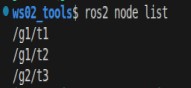
Then when that launch file runs, you just open another terminal and type ros2 node list in bash to see how these nodes are grouped:
What if you used namespace when creating the Node tag...
Suppose that, on the basis of the original code, t1 is changed to:
XML:
...
<node pkg="turtlesim" exec="turtlesim_node" name="t1" namespace="extra1"/>
<!--                                                     👆NEW! -->
...
YAML:
...
- node:
    pkg: "turtlesim"
    exec: "turtlesim_node"
    name: "t1"
    namespace: "extra1"  # 👈NEW!
...
Then when that launch file runs, the Node grouping becomes:
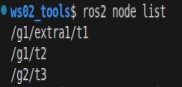
Essentially it just stacks one more namespace on the given Node, like this = =
6. Event triggers: none
Yep — XML and YAML have no event-trigger functions. Someone probably thought writing them was too much hassle and just cut them out, I guess...
Important
This article was translated by Hermes Agent; the original text can be found at here. The translation is for reference only. Translation time: 2026-11-05