
006_Ubuntu 24.04 didn't get to the graphical login screen after one restart
Background
The user runs Ubuntu 24.04 in a virtual machine created with VMware Workstation Pro, and it had been going fine like that for about 7 months. But after one restart the system failed to reach the graphical login screen and reported [FAILED] Failed to start gdm.service - GNOME Display Manager.

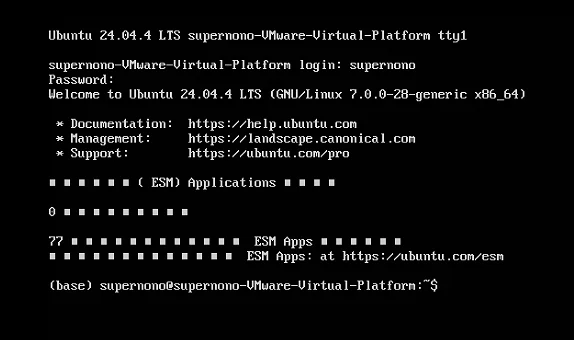
On that screen the user tried Ctrl + Alt + F2 to drop straight into a character terminal (tty1), which showed Ubuntu 24.04.4 LTS ... tty1 and asked for a login. The user could log in fine, but gdm3 (the GNOME Display Manager) never started, so there was no graphical interface.
What happened
After boot the system sat at the
tty1command line with no GUI.Running
systemctl status gdm3showed the service asinactive (not running), but with no obvious error log.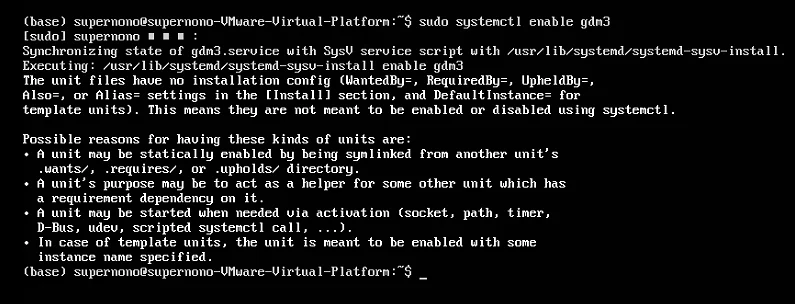
Running
sudo systemctl enable gdm3produced the warning "The unit files have no installation config", meaning it could not be set to start at boot throughsystemctl enable.Trying
sudo apt install --reinstall gdm3to reinstall it threw anE: /var/cache/apt/archives/error (output truncated), pointing at a problem with the APT cache or the disk space.systemctl get-defaultshowed the system's default boot target wasmulti-user.targetrather thangraphical.target, which is why the GUI did not start on boot.
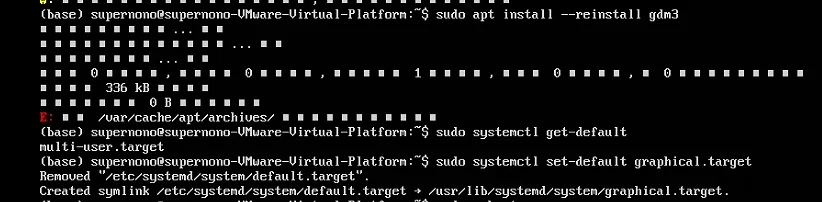
(most of the letters had even turned into little boxes — an encoding problem)
Root cause analysis
After working through it step by step, the root cause turned out to be: not enough disk space.
Concretely, the virtual machine had been given 32GB of disk when it was first set up, and Stacer confirmed that the root partition / was over 95% full.
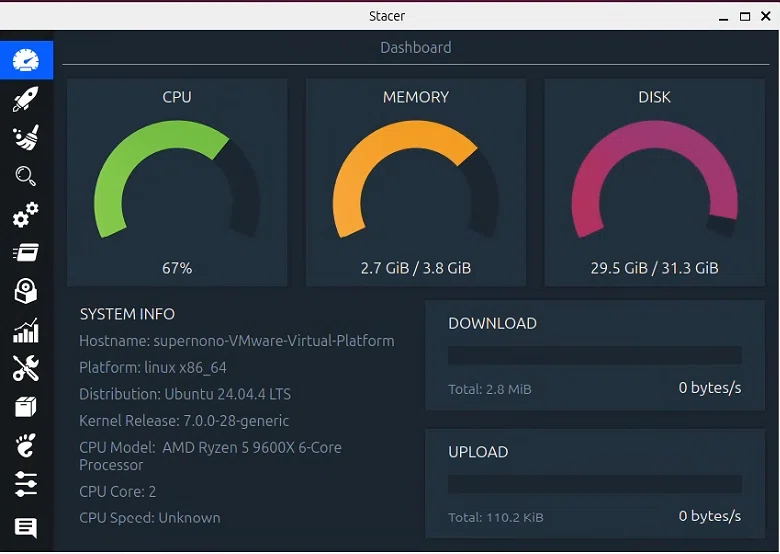
Running out of disk space caused all of the following:
- The
APTcache directory/var/cache/apt/archives/could not be written, so reinstallinggdm3failed; - System services (including
gdm3) may fail to start because they cannot create temporary files or logs; - On boot the system drops back to
multi-user.target(command-line mode) on its own, to keep the GUI from falling over for lack of resources.
What I did
1. Emergency disk cleanup
- Ran
sudo apt autoremoveto delete unneeded dependency packages. - Ran
sudo apt autocleanto clear the cache of already-downloaded old packages. - Ran
sudo journalctl --vacuum-size=100Mto shrink the system logs, freeing about100MB. - Ran
sudo rm -rf /var/cache/apt/archives/*to empty the corruptedAPTcache. - Ran
sudo apt updateto refresh the package sources. - Reinstalled
gdm3:sudo apt install --reinstall gdm3. - Set the default boot target to
graphical.target:sudo systemctl set-default graphical.target. - Started the gdm3 service:
sudo systemctl start gdm3, and the GUI came back.
2. Growing the virtual disk for real
Looking into it, the system does not use LVM but plain partitions (in this system sda2 is mounted directly as the root directory /).
- Shut the virtual machine down and delete every snapshot in VMware Workstation.
- In the VM settings, grow the hard disk from 32GB to 64GB.
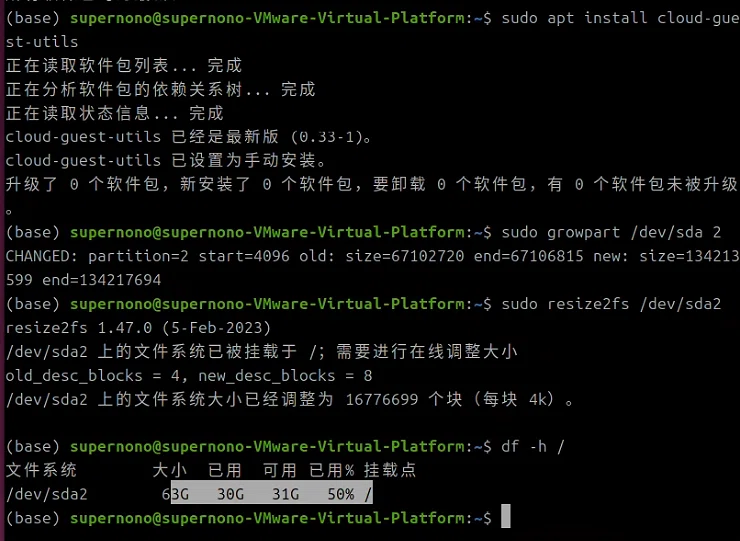
- Boot the VM, get to a terminal and run the commands below:
- Install the grow tools:
sudo apt install cloud-guest-utils. - Grow partition
sda2(the root partition) into the unallocated space:sudo growpart /dev/sda 2. - Grow the filesystem (ext4):
sudo resize2fs /dev/sda2. - Verify:
df -h /showed the root partition at about63GBtotal with about31GBfree, so the resize worked.
Final result
The graphical interface came back completely, gdm3 starts as it should and the login screen appears. Free space on the root partition went from under 2GB to 31GB, which fixed the lack of disk space at the root. The virtual machine has been running steadily since, and can install software and take system updates normally again.
Takeaways
Running out of disk space is a common reason for system services (especially the GUI) failing to start, so df -h should be the first thing you check. And in a virtual machine, growing the virtual disk and extending the partition is a far more thorough fix than simply clearing out junk.
Important
This article was translated by Hermes Agent; the original text can be found at here. The translation is for reference only. Translation time: 2026-11-05