
ROS2学习笔记集
2024/9/12...大约 3 分钟
简述
这里是我有关ROS2的相关笔记,这些笔记内所使用的相关软硬件配置为:
- ROS2 Jazzy Jalisco LTS
- Ubuntu 24.04.3 LTS
- Raspberry Pi 5B (4GB)
这些笔记大部分参考以下网站和视频教程写成:
- ROS2-Jazzy官方支持文档: ROS 2 Documentation — ROS 2 Documentation: Jazzy documentation
- 清华大学出版社出版的《ROS机器人理论与实践》教材的主要作者赵虚左的ROS2网课: 猛狮集训营视频合集·ROS2理论与实践核心篇
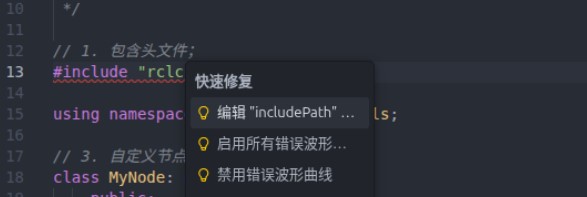
在书写 C++ 文件时发现头文件报错
可以通过 “编辑includePath...” 选项:
找到“包含路径”选项:
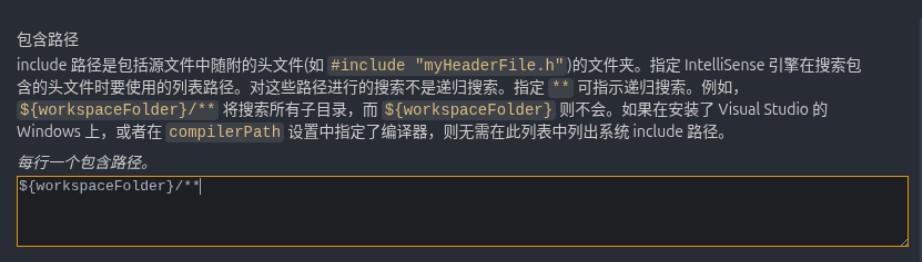
另起一行添加:
/opt/ros/jazzy/include/**即可。
在书写 C++ 文件时发现无补全提示
按 Ctrl+Shift+P(Windows/Linux) 或 Cmd+Shift+P(Mac),输入 C/C++: Edit Configurations (UI) 并选择该命令。在弹出的配置界面中无需修改任何选项,直接点击右上角的保存按钮。VSCode 会自动在项目根目录的 .vscode 文件夹下生成 c_cpp_properties.json 文件。 可以通过 编辑c_cpp_properties.json 文件,在内部添加"compilerPath":
{
    "configurations": [
        {
            "name": "Linux",
            "includePath": [
                "${workspaceFolder}/**",
                "/opt/ros/jazzy/include/**"
            ],
            "defines": [],
            "compilerPath": "/usr/bin/g++", // 👈 NEW!!
            "cStandard": "c17",
            "cppStandard": "gnu++17",
            "intelliSenseMode": "linux-gcc-x64"
        }
    ],
    "version": 4
}
之后保存重启 VSCode 即可。
可以使用的代码片段
以下为一些可以使用的代码片段,包括 node 和 launch:
// cpp.json
{
 "ros2_node_cpp":{
  "prefix": "ros2_node_cpp",
  "body": [
   " /*",
   "    需求:",
   "    步骤:",
   "        1. 包含头文件;",
   "        2. 初始化 ROS2 客户端",
   "        3. 自定义节点类:",
   "",
   "        4. 调用spin函数,并传入节点对象指针",
   "        5. 释放资源。",
   " */",
   "",
   "// 1. 包含头文件;",
   "#include \"rclcpp/rclcpp.hpp\"",
   "",
   "// 3. 自定义节点类:",
   "class MyNode: public rclcpp::Node{",
   "    public:" ,
   "        MyNode() : Node(\"mynode_node_cpp\"), count_(0)",
   "        {",
   "",
   "        }",
   "};",
   "",
   "int main(int argc, char *argv[])",
   "{",
   "    // 2. 初始化 ROS2 客户端",
   "    rclcpp::init(argc, argv);",
   "    // 4. 调用spin函数,并传入节点对象指针。",
   "    rclcpp::spin(std::make_shared<MyNode>());",
   "    // 5.释放资源;",
   "    rclcpp::shutdown();",
   "    return 0; ",
   "} "
  ],
  "description": "ros2 node 用户代码片段"
 },
}
// python.json
{
"ros2 node": {
"prefix": "ros2_node_py",
"body": [
"\"\"\" ",
" 需求:",
" 流程:",
" 1.导包;",
" 2.初始化ROS2客户端;",
" 3.自定义节点类;",
" ",
" 4.调用spain函数,并传入节点对象;",
" 5.资源释放。 ",
"",
"",
"\"\"\"",
"# 1.导包;",
"import rclpy",
"from rclpy.node import Node",
"",
"# 3.自定义节点类;",
"class MyNode(Node):",
" def __init__(self):",
" super().__init__(\"mynode_node_py\")",
"",
"def main():",
" # 2.初始化ROS2客户端;",
" rclpy.init()",
" # 4.调用spain函数,并传入节点对象;",
" rclpy.spin(MyNode())",
" # 5.资源释放。 ",
" rclpy.shutdown()",
"",
"if __name__ == '__main__':",
" main()",
],
"description": "ros2 node"
},
"ros2 launch py": {
"prefix": "ros2_launch_py",
"body": [
"from launch import LaunchDescription",
"from launch_ros.actions import Node",
"# 封装终端指令相关类--------------",
"# from launch.actions import ExecuteProcess",
"# from launch.substitutions import FindExecutable",
"# 参数声明与获取-----------------",
"# from launch.actions import DeclareLaunchArgument",
"# from launch.substitutions import LaunchConfiguration",
"# 文件包含相关-------------------",
"# from launch.actions import IncludeLaunchDescription",
"# from launch.launch_description_sources import PythonLaunchDescriptionSource",
"# 分组相关----------------------",
"# from launch_ros.actions import PushRosNamespace",
"# from launch.actions import GroupAction",
"# 事件相关----------------------",
"# from launch.event_handlers import OnProcessStart, OnProcessExit",
"# from launch.actions import ExecuteProcess, RegisterEventHandler,LogInfo",
"# 获取功能包下share目录路径-------",
"# from ament_index_python.packages import get_package_share_directory",
"",
"def generate_launch_description():",
" ",
" return LaunchDescription([])"
],
"description": "ros2 launch"
}
}