
ROS2-004-Communication Mechanisms: Topic Communication — Branch Two — Custom Message Interfaces
Implementing topic communication with a custom message interface
In Case 1, the message Case 1 publishes is a string of text, and its message type is one of ROS2's built-in message types. Compared with using a native message interface, the data carrier behind a message published through a custom message interface is not predefined, so we have to configure it ourselves.
Next we'll implement topic communication using a custom message interface. If you haven't done the preparation in Ubuntu yet, see here.
The custom message interface file
For the actual implementation, see here
C++
1. Implementing the publisher
In the src directory of the cpp01_topic package, create a new C++ file demo03_talker_self.cpp, edit it, and enter the following:
/*
    Requirement: publish the text "student info" at some fixed frequency, which includes the student's age, name, height and other data.
    Steps:
        1. Include the header files;
        2. Initialise the ROS2 client
        3. Custom node class:
            3-1. Create the publisher;
            3-2. Create the timer;
            3-3. Assemble the message and publish it.
        4. Call the spin function, passing in the node object pointer
        5. Release resources.
 */

// 1. Include the header files;
#include "rclcpp/rclcpp.hpp"
#include "base_interfaces_demo/msg/student.hpp"

using namespace std::chrono_literals;
using base_interfaces_demo::msg::Student;

// 3. Custom node class:
class MinimalPublisher : public rclcpp::Node
{
    public:
    // count_(0) initialises count_ to 0
        MinimalPublisher() : Node("minimalpublisher"), count_(0)
        {
        // 3-1. Create the publisher;

        /*
            Template: the message type being published
            Parameters:
                1. topic name;
                2. QOS (message queue length);
            Return value: publisher object pointer.
         */

        publisher_ = this->create_publisher<Student>("topic_self", 10);
        // 3-2. Create the timer;
        /*
            Parameters:
                1. time interval;
                2. callback;
            Return value: timer object pointer.
         */
        timer_ = this->create_wall_timer(500ms, stc::bind(&MinimalPublisher::timer_callback, this))
        }

    private:
        void timer_callback()
        {
            // 3-3. Assemble the message and publish it.
            auto message = Student();
            message.name = 'Ankh';
            message.age = count_++;
            message.height = 1.65;
            RCLCPP_INFO(this->get_logger(), "Published student message: name=%s, age=%d, height=%.2f", message.name.c_str(), message.age, message.height);

            publisher_->publish(message);

        }
        rclcpp::Publisher<Student>::SharedPtr publisher_;
        rclcpp::TimerBase::SharedPtr timer_;
        size_t count_;
};

int main(int argc, char *argv[])
{
    // 2. Initialise the ROS2 client
    rclcpp::init(argc, argv);
    // 4. Call the spin function, passing in the node object pointer.
    rclcpp::spin(std::make_shared<MinimalPublisher>());
    // 5. Release resources;
    rclcpp::shutdown();
    return 0;
}
2. Implementing the subscriber
In the src directory of the cpp01_topic package, create a new C++ file demo04_listener_self.cpp, edit it, and enter the following:
/*

  Requirement: subscribe to the student message published by the publisher, and output it to the terminal.
  Steps:
     1. Include the header files;
     2. Initialise the ROS2 client;
     3. Custom node class;
        3-1. Create the subscriber;
        3-2. Handle the messages received.
     4. Call the spin function, passing in the node object pointer;
     5. Release resources.
*/

// 1. Include the header files;
#include "rclcpp/rclcpp.hpp"
#include "base_interfaces_demo/msg/student.hpp"

using base_interfaces_demo::msg::Student;
using std::placeholders::_1;
// 3. Custom node class;

class MinimalSubscriber : public rclcpp::Node
{
  public:
    MinimalSubscriber()
    : Node("minimal_subscriber")
    {
     // 3-1. Create the subscriber;
    /*
        Template: the message type;
        Parameters:
            1. topic name (must match the publisher's)
            2. QOS: queue length;
            3. callback;
        Return value: the pointer for the subscription object

     */
     subscription_ = this->create_subscription<Student>("topic_self", 10, std::bind(&MinimalSubscriber::topic_callback, this, _1));
    }

  private:
    // 3-2. Handle the messages received;
    void topic_callback(const Student &msg) const
    {
      RCLCPP_INFO(this->get_logger(), "Subscribed student message: name=%s, age=%d, height=%.2f", msg.name.c_str(), msg.age, msg.height);
    }
      rclcpp::Subscription<Student>::SharedPtr subscription_;
};

int main(int argc, char *argv[])
{
  // 2. Initialise the ROS2 client;
  rclcpp::init(argc, argv);
  // 4. Call the spin function, passing in the node object pointer.
  rclcpp::spin(std::make_shared<MinimalSubscriber>());
  // 5. Release resources;
  rclcpp::shutdown();
  return 0;
}
3. Editing the configuration files
In a C++ package there are two configuration files to look at: package.xml and CMakeLists.txt. If the file is one you created yourself, it needs extra configuration for each file.
Ⅰ. package.xml
When the package was created, the packages it depends on were already configured automatically, as follows:
<!-- package.xml -->
<depend>rclcpp</depend>
<depend>std_msgs</depend>
<depend>base_interfaces_demo</depend>
One thing to explain:
- Unlike the native node implementation, in this case
<depend>std_msgs</depend>is not required. - If a node you created pulls in new related packages, the extra package configuration has to be added for each node file.
Ⅱ. CMakeLists.txt
The core configuration for the publisher and subscriber programs in CMakeLists.txt is as follows:
find_package(rclcpp REQUIRED)
find_package(std_msgs REQUIRED)
find_package(base_interfaces_demo REQUIRED)

add_executable(demo03_talker_self src/demo03_talker_self.cpp) ament_target_dependencies(
  demo03_talker_self
  "rclcpp"
  "std_msgs"
  "base_interfaces_demo"
)

add_executable(demo04_listener_self src/demo04_listener_self.cpp) ament_target_dependencies(
  demo04_listener_self
  "rclcpp"
  "std_msgs"
  "base_interfaces_demo"
)

install(TARGETS
 demo03_talker_self
 demo04_listener_self
 DESTINATION lib/${PROJECT_NAME})
One thing to explain: if you created new nodes and they get pulled in, the following has to be done for each node file:
If a node you created pulls in new related packages, the extra package configuration has to be set up for each node through
find_package;A node you created needs three extra configuration items —
add_executable,ament_target_dependenciesandinstall, where:add_executableneeds its node name and where the file lives added;ament_target_dependenciesneeds its node name and the names of the packages it references added for each node file;installneeds its node name added
4. Build
In a terminal, go into the current workspace and build the package:
colcon build --packages-select cpp01_topic5. Run
In the current workspace, open two terminals: terminal 1 runs the publisher program, terminal 2 runs the subscriber program.
Terminal 1 takes the following commands:
. install/setup.bash
ros2 run cpp01_topic demo03_talker_self
Terminal 2 takes the following commands:
. install/setup.bash
ros2 run cpp01_topic demo04_listener_self
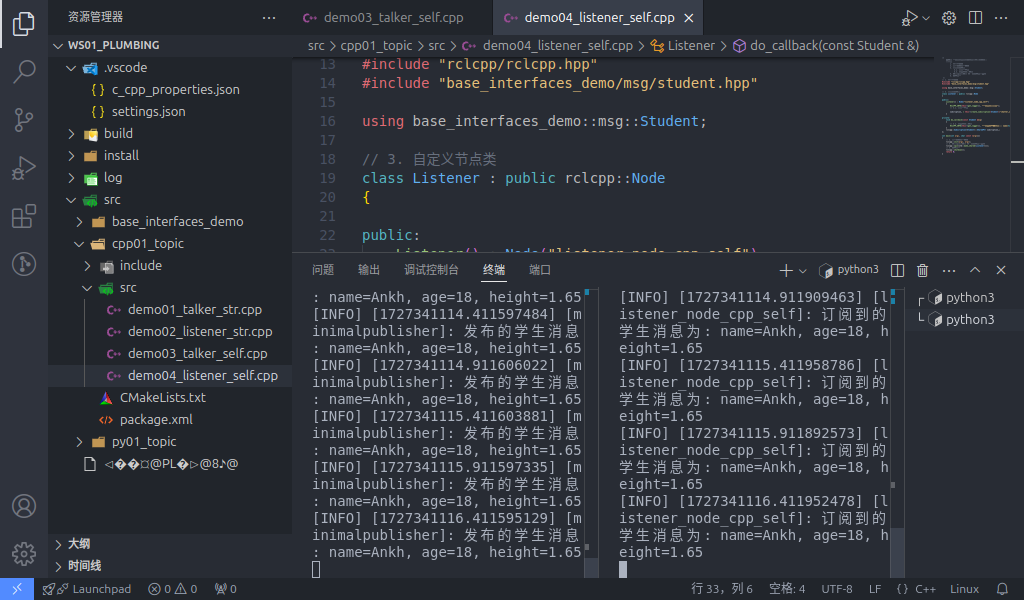
The final output should look like the screenshot below.
What the spin function does
Calling the spin function in main suspends the main program, enters the node object through the node object pointer passed in earlier, and runs the callbacks inside that node object. So in short, spin can be used to call the callbacks inside a node object; without the spin function those callbacks never run.
Python
1. Publisher Implementation
In the py01_topic directory of the py01_topic package, create a new Python file demo03_talker_self_py.py, edit it, and enter the following:
"""

  Requirement: publish the text "student info" at some fixed frequency, which includes the student's age, name, height and other data.
  Steps:
     1. Import the packages;
     2. Initialise the ROS2 client;
     3. Define the node class;
        3-1. Create the publisher;
        3-2. Create the timer;
        3-3. Assemble the message and publish it.
     4. Call the spin function, passing in the node object;
     5. Release resources.
"""
# 1. Import the packages;
import rclpy
from rclpy.node import Node
from base_interfaces_demo.msg import Student

# 3. Define the node class;
class MinimalPublisher(Node):

  def __init__(self):
    super().__init__('minimal_publisher_py')

    # 3-1. Create the publisher;
    """
        Parameters:
            1. the message type
            2. topic name
            3. QOS. (queue length)
        Return value: the publisher object.
    """

    self.publisher_ = self.create_publisher(Student, 'topic_self', 10)

    # 3-2. Create the timer;
    """
        Parameters:
            1. time interval
            2. callback
        Return value: the timer object.
    """
    timer_period = 0.5
    self.timer = self.create_timer(timer_period, self.timer_callback)
    # create the counter
    self.counter = 0

    # 3-3. Assemble the message and publish it.
    def timer_callback(self):
    msg = Student()
    msg.name = 'Ankh';
    msg.age = 18 + self.counter;
    msg.height = 1.65;
    self.publisher_.publish(msg)
    self.get_logger().info('Published message: name=%s, age=%d, height=%.2f', % (msg.name, msg.age, msg.height))
    self.counter += 1

def main(args=None):
   # 2. Initialise the ROS2 client;
    rclpy.init(args=args)

   # 4. Call the spin function, passing in the node object;
    minimal_publisher = MinimalPublisher()
    rclpy.spin(minimal_publisher)

   # 5. Release resources.
    rclpy.shutdown()

if __name__ == '__main__':
  main()
2. Subscriber Implementation
In the py01_topic directory of the py01_topic package, create a new Python file demo04_listener_self_py.py, edit it, and enter the following:
"""
  Requirement: subscribe to the student message published by the publisher, and output it to the terminal.
  Steps:
     1. Include the header files;
     2. Initialise the ROS2 client;
     3. Custom node class;
        3-1. Create the subscriber;
        3-2. Handle the messages received.
     4. Call the spin function, passing in the node object pointer;
     5. Release resources.

"""

# 1. Include the header files;
import rclpy
from rclpy.node import Node
from base_interfaces_demo.msg import Student

# 3. Custom node class;
class MinimalSubscriber(Node):

    def __init__(self):
        super().__init__("minimal_subscriber_py")
    # 3-1. Create the subscriber;
    """
        Parameters:
            1. the message type;
            2. topic name (must match the publisher's)
            3. callback;
            4. QOS: queue length;
        Return value: the subscription object

    """

     self.subscription = self.create_subscription(Student, "topic_self", self.listener_callback, 10)

    def listener_callback(self, msg):

        # 3-2. Handle the messages received;
        self.get_looger().info("Subscribed message: name=%s, age=%d, height=%.2f", % (msg.name, msg.age, msg.height))


def main():
{
      # 2. Initialise the ROS2 client;
    rclpy.init()

    # 4. Call the spin function, passing in the node object.
    minimal_subscriber = MinimalSubscriber()
    rclpy.spin(minimal_subscriber);
    # 5. Release resources;
    rclpy.shutdown()
}

if __name__ == '__main__':
  main()
3. Editing the Configuration Files
In a Python package there are two configuration files to look at: package.xml and setup.py. If the file is one you created yourself, it needs extra configuration for each file.
Ⅰ. package.xml
When the package was created, the packages it depends on were already configured automatically, as follows:
<!-- package.xml -->
<depend>rclpy</depend>
<depend>std_msgs</depend>
<depend>base_interfaces_demo</depend>
One thing to explain:
- In this case
<depend>std_msgs</depend>is not required. - If a node you created pulls in new related packages, the extra package configuration has to be added for each node file.
Ⅱ. setup.py
The core configuration for the publisher and subscriber programs in setup.py is as follows:
......

setup(
    ......
    entry_points={
        'console_scripts': [
            'demo03_talker_self_py = py01_topic.demo03_talker_self_py:main',
            'demo04_listener_self_py = py01_topic.demo04_listener_self_py:main',
        ],
    },
)
One thing to explain: if you created new nodes and they get pulled in, the following has to be done for each node file:
A node you created needs the extra
console_scriptsconfiguration item, to give the compiler the location of the executable, in the format:- 'node name = package name the node lives in.node name:main'
Normally you just copy the code the program generated and modify it, so here the 'package name the node lives in' is the same for all of them.
4. Build
In a terminal, go into the current workspace and build the package:
colcon build --packages-select py01_topic5. Run
In the current workspace, open two terminals: terminal 1 runs the publisher program, terminal 2 runs the subscriber program.
Terminal 1 takes the following commands:
. install/setup.bash
ros2 run py01_topic demo03_talker_self_py
Terminal 2 takes the following commands:
. install/setup.bash
ros2 run py01_topic demo04_listener_self_py
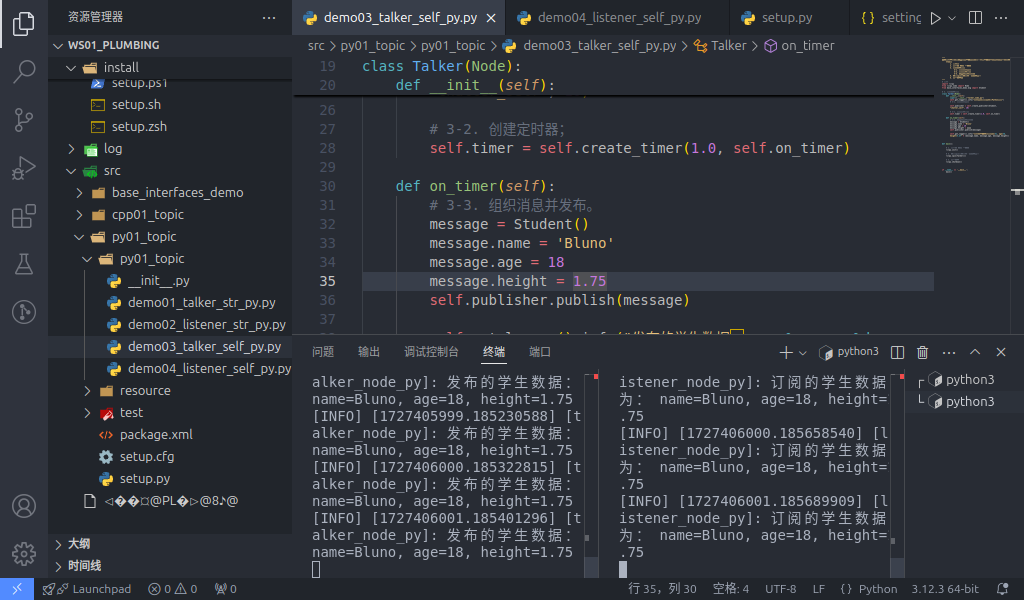
The final output should look like the screenshot below.
What the spin function does
Same as described in the C++ execution steps above: calling the spin function in main suspends the main program, enters the node object through the node object pointer passed in earlier, and runs the callbacks inside that node object. So in short, spin can be used to call the callbacks inside a node object; without the spin function those callbacks never run.
Summary
Once you've implemented the custom message interface, you can go on to implement the native message interface, or head back to ROS2-004-Communication Mechanisms: Topic Communication to read this section's summary.
Important
This article was translated by Hermes Agent; the original text can be found at here. The translation is for reference only. Translation time: 2026-11-05