
How is Vue 3's data reactivity implemented? (Part 1)
Overview
Here I'll walk you through how Vue 3 implements data reactivity, starting from how the source is put together. This is part one.
Reference: Vue Mastery — Vue 3 Reactivity
Starting from a simple template
Let's start by creating a simple Vue app and an html template:
<!DOCTYPE html>
<html lang="en">
<head>
    <meta charset="UTF-8">
    <meta name="viewport" content="width=device-width, initial-scale=1.0">
    <title>Document</title>
</head>
<script src="https://cdn.jsdelivr.net/npm/[email protected]/dist/vue.js"></script>

<body>
    <div id = "app">
        <div>Price: ${{ price }}</div>
        <div>Total: ${{ price * quantity}}</div>
        <div>Taxes: ${{ totalPriceWithTax }}</div>
    </div>

</body>


<script>
    let vm = new Vue({
        el: '#app',
        data: {
            price: 5.00,
            quantity: 2
        },
        computed: {
            totalPriceWithTax() {
                return this.price * this.quantity * 1.03
            }
        },

    })
</script>

</html>
We already know that when we change price to 10.00, Vue knows how to update the relevant template info inside the HTML, and it can also update the computed property that depends on it, and update the relevant template info in the HTML at the same time. So here's a question: How does Vue know in what way it should be modified?
After all, in plain old JavaScript code, suppose we have a snippet:
let price = 5
let quantity = 2
let total = price * quantity
console.log(`total is: ${total}`)
Obviously the log here prints total is: 10. But when we modify price:
price = 10
console.log(`total is: ${total}`)
Obviously the log here still prints total is: 10. Because in this snippet, JS code runs in a very simple top-to-bottom order. So even if you modify price, the value of total won't be touched at all. In other words, in this piece of JavaScript, total can't get the reactive update we want. So to make this code recompute and update the value of total after price is modified (updated), what method should we use?
The three functions of reactivity — effect, track, trigger
To make this code recompute and update the value of total after price is modified (updated), we should try putting the formula above into some kind of storage class that's easy to iterate over, turning it into a sort of update function that can be called over and over. That way, later on we can just call this function to get a fairly convenient update.
And suppose the object we have contains many variables like total that all use the same variable price in their calculation, and each of those variables has its own kind of storage class — that means we'd also need a storage class that's easy to iterate, to store every one of those per-variable storage classes, and so on and so forth.
Sounds like a pain, but let's write it step by step.
First we name this update function effect, because this function can be thought of as having some kind of effect on total:
// the original definition
let total = price * quantity
// the function after the change
let total = 0
let effect = function() {
    total = price * quantity
}
Then we need a method for saving this update function; when we want to save it, or rather when we want to track this value, we call this method. We name this tracking function track:
track()Finally we need a method for firing this update function; when we've updated price, we call this method to trigger the previously stored update function effect(). We name this triggering function trigger:
trigger()If we chain these three functions together, it roughly looks like this:
let price = 5
let quantity = 2
let total = 0
let effect = function() {
    total = price * quantity
}

// declare that total should be tracked
track()
// run the update function once to get the first value of total
effect()
...
// on some later update, assuming price or quantity was modified, call this function to fire it
trigger()
Storing the "update function" in a suitable container — a Set
To make each function appear only once in this easy-to-iterate storage class, with no duplicate values, we need to store them in some kind of hash structure, and it should be a set of unique values. So we use Set — a set object — to store them.
Info
Set is an object type added in ES6, and what it stores is a set of unique values. That is, even if you put the same element into a Set, only one copy of it is kept.
Here we'd normally define it like this:
...
// define dep as a Set object used to store functions; here "dep" stands for "dependency"
dep = new Set()
let effect = () => { total = price * quantity }// cut down to an arrow function
...
With that, we can define the two functions track and trigger mentioned above:
function track() {
    // what this function does is add the effect we defined to dep
    dep.add(effect)
}

function trigger() {
    // what this function does is walk every effect in dep and run them
    dep.forEach((effect) => {effect()})
}
So the earlier code becomes:
let price = 5
let quantity = 2
let total = 0

dep = new Set() // stands for "dependency"
let effect = () => { total = price * quantity }// cut down to an arrow function

function track() {
    // add the effect we defined to dep
    dep.add(effect)
}

function trigger() {
    // walk every effect in dep and run them
    dep.forEach((effect) => {effect()})
}

// first declare that the property should be tracked
track()
// then run the update function once to get the first value of total under the property's effect
effect()
...
So in this situation, if we set price to 10 like we did at the start, the value still doesn't change when we try to print total — but we can now update it by hand. As long as we call trigger() after updating price, we can manually update the value of total.
Stringing all the Sets together into a Map
Usually our object has more than one property, and to watch each of those properties separately, every one of them needs its own dep, or rather its own Set of effects. So how should we store these per-property deps so they're easier to manage?
For example, let's wrap the earlier price and quantity in a product object:
let product = {price = 5, quantity = 2}For the product object, every property inside it needs its own dep.
So that we can find them more easily later, we need to store these deps somewhere shared and quick to iterate. So we create a depMap, which is a "Map" class. This class is full of key-value pairs: we take each property's name as the key, and then take that property's own dep, that is, the Set object, as the value.
Let's try writing "depMap":
const depMap = new Map()Then our track() function becomes:
function track(key) {
    // use the passed property value as key, find the matching dep
    dep = depMap.get(key)
    // in case there is no dep yet, let's just make a new one
    if (!dep) {
        depMap.set(key, (dep = new Set()))
    }
    // add the effect we defined to dep
    dep.add(effect)
}
The trigger() function becomes:
function trigger(key) {
    // use the passed property value as key, find the matching dep
    dep = depMap.get(key)
    // if dep exists
    if (dep) {
        // walk every effect in dep and run them
        dep.forEach((effect) => {effect()})
    }
    // if dep does not exist there is nothing to run, just skip

}
Then our original code needs to be changed to this:
Info
Because track() and trigger() are starting to get long, we omit them together with depMap (the code shown as ...). Just know it's the same function being called.
let product = {price = 5, quantity = 2}
let total = 0

let effect = () => { total = product.price * product.quantity }// cut down to an arrow function

...
// first declare that the property should be tracked, using price as an example
track("price")
// then run the update function once to get the first value of total
effect()
Same as before: if we set price to 10 like we did at the start, the value still doesn't change when we try to print total, but after updating price we call trigger("price") and we can update the value of total by hand.
Stringing all the Maps together into a WeakMap
Up to here, we've got a fairly standard way of tracking dependencies for different properties on the same object — but what if we have multiple reactive objects? How would you handle those, then?
"Why not string the previous depMaps together with another Map class? Just like depMap itself: take each reactive object as the key, and then take that object's depMap, that is, the Map object, as the value to map?"
Worth a try.
Let's set up another Map-like storage place; here we use WeakMap. WeakMap is similar in structure to Map, but WeakMap has a few advantages:
- It only accepts objects as keys (null excepted); no other type of value can be used as a key.
- A WeakMap key is not a formal reference and won't prevent JS from doing garbage collection, but as long as the key exists, the key/value pair stays in the map and is treated as a reference to the value, so the referenced object won't be counted by the garbage collector. (For a detailed intro to garbage collection you can look here.) This trait is similar to how a reactive object is expected to behave.
We usually call it targetMap. As for why, you can look for the answer in the next post.
Let's try writing "targetMap":
const targetMap = new WeakMap()
    ...
Then our track() function becomes:
    ...
function track(target, key) {

    // use the passed object as target, find the matching depMap
    let depMap = targetMap.get(target)
    // in case there is no depMap yet, let's just make a new one
    if (!depMap) {
        targetMap.set(target, (depMap = new Map()))
    }

    // use the passed property value as key, find the matching dep
    let dep = depMap.get(key)
    // in case there is no dep yet, let's just make a new one
    if (!dep) {
        depMap.set(key, (dep = new Set()))
    }
    // add the effect we defined to dep
    dep.add(effect)
}
    ...
The trigger() function becomes:
    ...
function trigger(target, key) {

    // use the passed object as target, find the matching depMap
    let depMap = targetMap.get(target)
    // in case there is no depMap yet, let's just make a new one
    if (!depMap) {
        // if depMap does not exist there is nothing to run, just skip
        return
    }

    // use the passed property value as key, find the matching dep
    let dep = depMap.get(key)
    // if dep exists
    if (dep) {
        // walk every effect in dep and run them
        dep.forEach((effect) => {effect()})
    }
    // if dep does not exist there is nothing to run, just skip
    ...
}
Then our original code needs to be changed to this:
Info
Because track() and trigger() are too long, they're omitted together with targetMap (the code shown as ...). Just know it's the same function being called.
let product = {price = 5, quantity = 2}
let total = 0

...

let effect = () => { total = product.price * product.quantity }// cut down to an arrow function

...

// first declare that the property should be tracked, using price as an example
track(product, "price")
// then run the update function once to get the first value of total
effect()
Same as before: if we set price to 10 like we did at the start, the value still doesn't change when we try to print total, but after updating price we call trigger(product, "price") and we can update the value of total by hand.
Wrap-up
In this chapter we did three things in total, to get our own reactive engine roughly built:
- Storing the "update function" in a suitable container — a Set
- Stringing all the Sets together into a Map
- Stringing all the Maps together into a WeakMap
In a picture, that looks like:
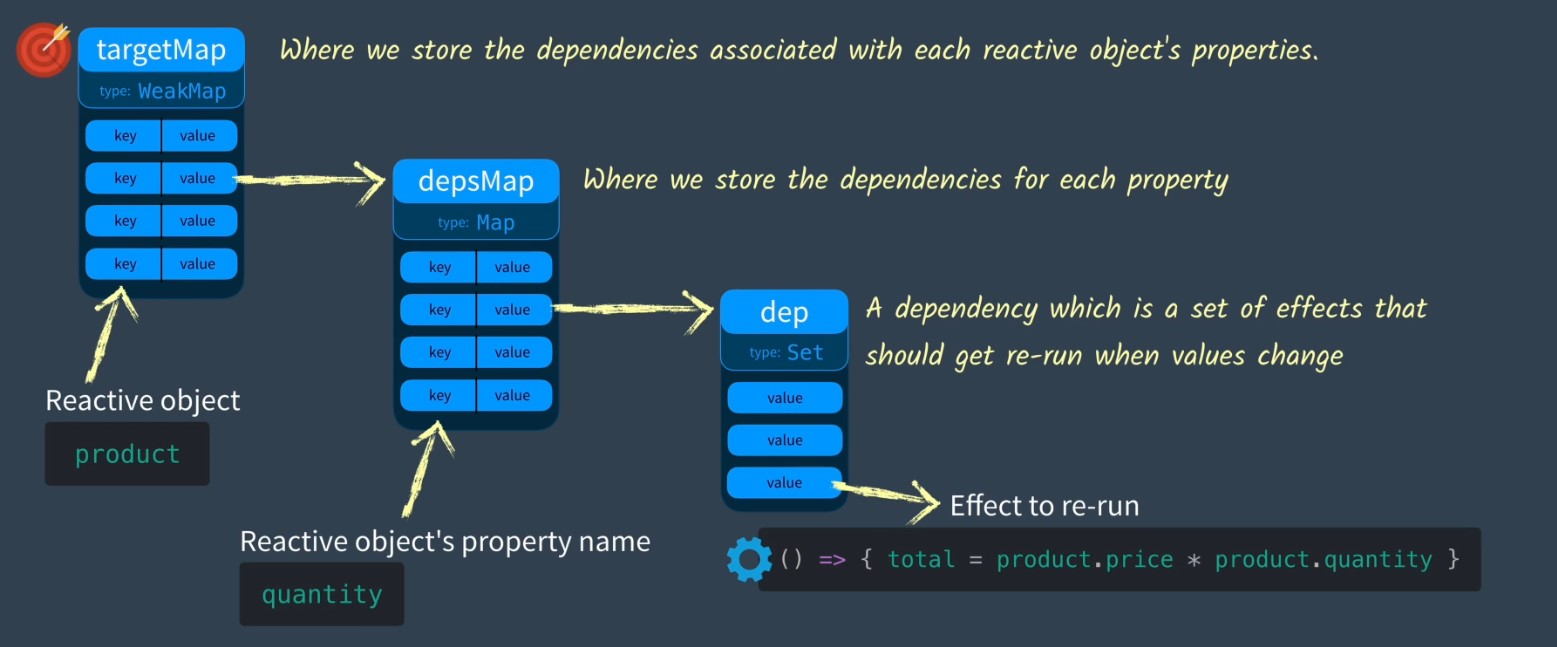
It feels like we did a lot of work, but in fact, up to this point we can still only use manual updates to observe the values we want to observe, and there is no way to make the update function Set of a specific property on a reactive object re-run by itself. Never mind — we'll cover it in the next part.
Important
This article was translated by Hermes Agent; the original text can be found at here. The translation is for reference only. Translation time: 2026-11-05